ASAM Exchange Format: CCX Structure
The ASAM Formats in particular
In principle, there are 3 different type of files, CCX, MDX and FSX. Per project, there is exactly on CCX file and typically per function one MDX and FSX file.
In the context of EHB, the CCX contains the table(s) of contents, all FCs with their references to FSX&MDX and the model locations. The FSX contains the text chapters with their texts and graphics and the MDX contains all label definitions and interfaces.
Component naming conventions for EHANDBOOK:
-
FC = function component, smallest software unit, which contains one Simulink or ASCET model
-
BC = base component, which contains multiple FCs
-
GC = group component, which contains multiple BCs
BCs and GCs allowing to design a hierarchical structure of the components, which is later on seen in the table of contents in NAV.
Supported ASAM Versions
EHB-CB supports ASAM CC in V3.0.0, ASAM FSX in V1.1.0 and ASAM MDX in V1.3.0. in their corresponding DTD versions. The supported encoding file format is UTF-8.
The keywords and objects of ASAM were read according to the standard, but interpreted to the needs of EHB. The support is limited to the use cases relevant to EHB and restricted to basic functionalities only.
The CCX File Structure
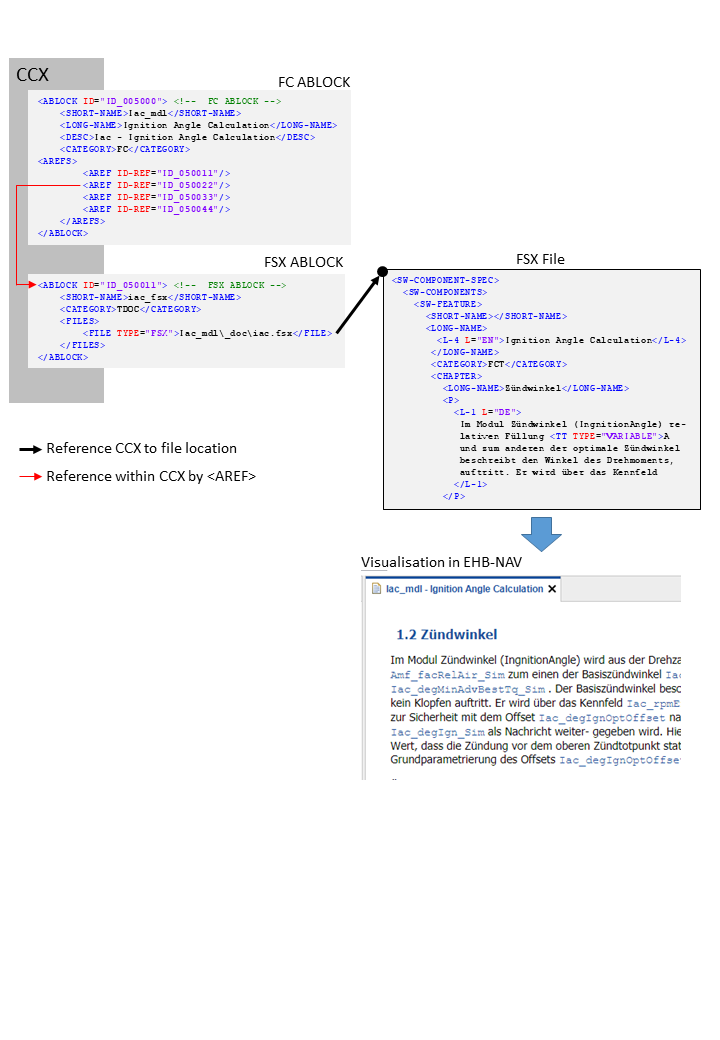
The CCX file structure for EHANDBOOK consists of a chain list of ABLOCKs, which refer other ABLOCKs using the AREF tag ID-REF value: <AREF ID-REF=”uniqueID-No”/>.
These ABLOCKs can be broadly classified and understood as Root ABLOCK, TOC ABLOCK, Components ABLOCKs (GC, BC, FC) and leaf ABLOCK (which is not having further reference to another ABLOCK)
Catalog and Root ABLOCK Usage
The CCX file starts with the CATALOG entry and a root block:
<CATALOG F-CM-TOOL-ID="$Id: catalog_V3_0_0.sl.dtd,v 1.1">
	<SHORT-NAME />
	<AREF ID-REF="EHB_Container" />
	<ABLOCKS>
		<ABLOCK ID="EHB_Container">
	...
The catalog entry has an AREF tag, which refers to the root ABLOCK.
Root ABLOCK
Referred from: <CATALOG> block with <AREF ID-REF="EHB_Container"/>
Refers to: TOC ABLOCKs/Special ABLOCKs
The Root ABLOCK provides info for the title page in EHB and refers the TOC ABLOCKS. Besides references to the TOCs, there are also some special general references to the following elements possible:
-
Global MDX file (see chapter One global MDX File)
-
Global CDF file (see chapter CDF ABLOCK Usage)
-
ASCET Library (see chapter ASCET Model Reference to global Library and other Sub-Components)
The Title Page and Project Information
The root ABLOCK contains the information about the project creation date, language, short-name, long-name, variant, etc. inside SDG tag which are used to create the title page for the container.
<!-- Root ABLOCK -->
<ABLOCK ID="EHB_Container">
	<SHORT-NAME>ehbContainer</SHORT-NAME>
	<DESC />
	<SDGS>
		<SDG GID="global">
			<SD GID="view">Detailed</SD>
			<SD GID="project_class">PVER</SD>
			<SD GID="project_longname">FlexECU-G1 Turbo</SD>
			<SD GID="project_shortname">EHB_Demo_Container</SD>
			<SD GID="project_date">2019-07-31 10:39:00</SD>
			<SD GID="Project_variant">V7.1.1</SD>
			<SD GID="Project_revision">3</SD>
			<SD GID="info_pver">EHANDBOOK Demo</SD>
			<SD GID="doc_class">SWCALDOC</SD>
			<SD GID="language">DE</SD>
			<SD GID="hide_component">true</SD>
			<SD GID="condition">true</SD>
			<SD GID="confidential_level_2">false</SD>
			<SD GID="doctype_text">Software Documentation</SD>
			<SD GID="legal_note">This document contains confidential information. Disclosure is prohibited without the written consent of ETAS GmbH.</SD>
			<SD GID="MATLAB_LIB_PATH">C:\Simulink\M160</SD>
		</SDG>
	</SDGS>
</ABLOCK>
The tag <SD GID="MATLAB_LIB_PATH"> is used to include global library files for Simulink models. For details, see chapter Simulink Model Reference to external Library.
|
The title page, the general font styling, the company logo and the footer text are configurable in the separate CSS and branding.properties files. Please refer to the document Title Page Style Guide for EHB-CB. |
Reference to TOCs
The different tables of content (TOCs), defined in separate ABLOCKS, are referenced also in the root ABLOCK.
<!-- Root ABLOCK -->
<ABLOCK ID="EHB_Container">
	<SHORT-NAME>ehbContainer</SHORT-NAME>
	<DESC />
	<AREFS>
		<AREF ID-REF="ID_00000">fcAlpha_axl</AREF>
		<AREF ID-REF="ID_00002">fcAlpha_mdl</AREF>
		<AREF ID-REF="ID_00003">architectureView_mdl</AREF>
	</AREFS>
</ABLOCK>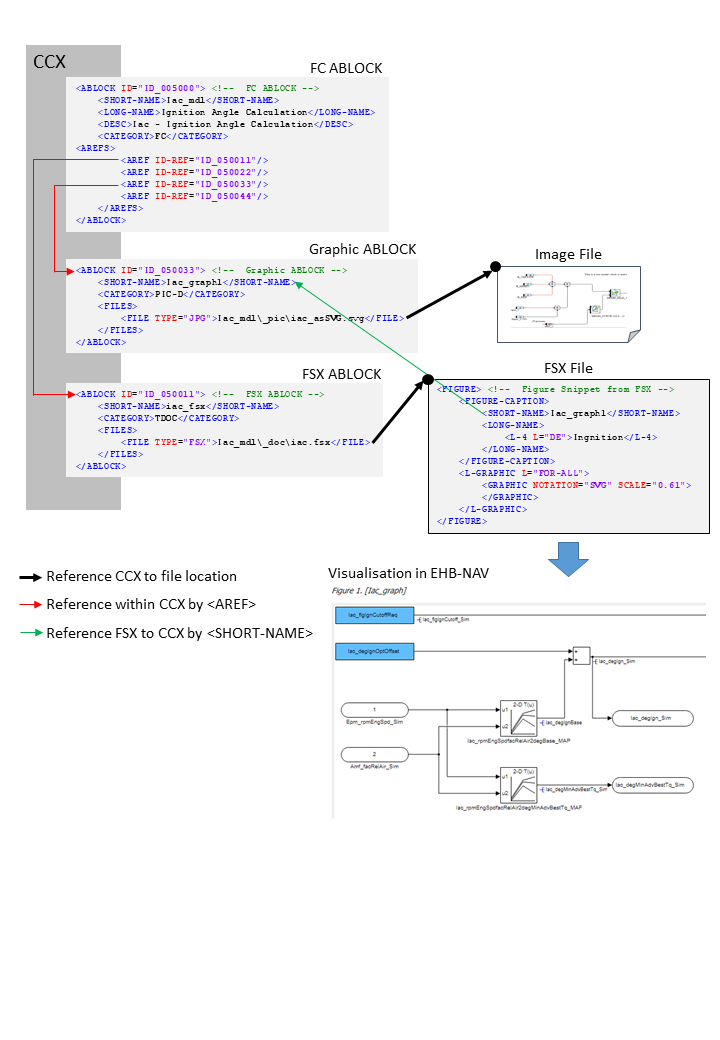
The references of the TOC ABLOCKs are visualized in EHB-NAV Document Explorer as shown in the figure below:
This will allow multiple TOCs, either with a different content or with the same content, but structured in a different way (e.g. alphabetical order and SW structure order)
TOC ABLOCK Usage
TOC ABLOCK
Referred from: Root ABLOCK
Refers to: Component ABLOCKs (BC, GC or directly to FC)
The TOC ABLOCK refer the ABLOCKs which are components (FC, BC, GC, …)
<CATEGORY>TOC
<ABLOCK ID="ID_00003">
	<SHORT-NAME>architectureView_mdl</SHORT-NAME>
	<LONG-NAME />
	<DESC>SW architecture view (Simulink models)</DESC>
	<CATEGORY>TOC</CATEGORY>
	<AREFS>
		<AREF ID-REF="ID_001000" />
		<AREF ID-REF="ID_0000301" />
		<AREF ID-REF="ID_0000302" />
		<AREF ID-REF="ID_002000" />
	</AREFS>
</ABLOCK>
A TOC block refers other structural blocks (BCs, GCs) or directly FCs.
A group of components in specific order forms the TOC. For example, the components can be grouped in alphabetical order.
A TOC ABLOCK sample with no further references to structure ABLOCKS visualized in EHB-NAV Document Explorer:
Structure ABLOCK Usage
Structure ABLOCK
Referred from: TOC ABLOCK
Refers to: another structure ABLOCK – GC ABLOCK or FC ABLOCK
The BC have references to FC’s. The category of Base Component is BC.
<CATEGORY>BC or GC
A TOC ABLOCK sample with references to structure ABLOCKS visualized in EHB-NAV Document Explorer:
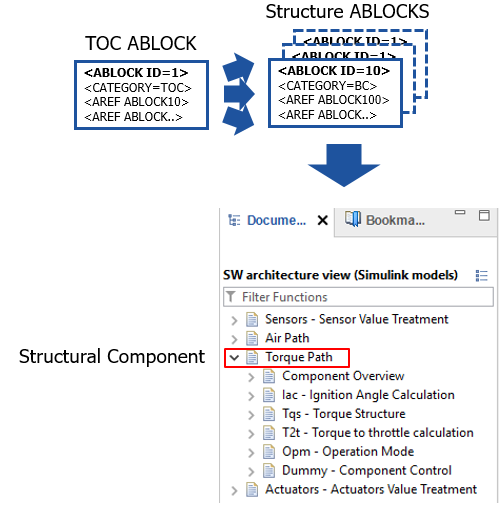
<!-- TOC Structure ABLOCK -->
<ABLOCK ID="ID_0000301">
	<SHORT-NAME>Air Path</SHORT-NAME>
	<LONG-NAME>Air Path</LONG-NAME>
	<DESC>Air Path</DESC>
	<CATEGORY>GC</CATEGORY>
	<AREFS>
		<AREF ID-REF="ID_003000" />
		<AREF ID-REF="ID_004000" />
		<AREF ID-REF="ID_005000" />
		<AREF ID-REF="ID_006000" />
		<AREF ID-REF="ID_007000" />
		<AREF ID-REF="ID_007067" />
		<AREF ID-REF="ID_007077" />
	</AREFS>
</ABLOCK>
FC ABLOCK Usage
FC ABLOCK
Referred from: TOC or Component ABLOCKs – BC ABLOCK, GC ABLOCK
Refers to: leaf ABLOCK (Those ABLOCKs that refers to the actual file of information and will not refer to further ABLOCKs)
<CATEGORY>FC
<!-- FC ABLOCK -->
<ABLOCK ID="ID_005000">
	<SHORT-NAME>Iac_mdl</SHORT-NAME>
	<LONG-NAME>Ignition Angle Calculation</LONG-NAME>
	<DESC>Iac - Ignition Angle Calculation</DESC>
	<CATEGORY>FC</CATEGORY>
	<AREFS>
		<AREF ID-REF="ID_050011"/>
		<AREF ID-REF="ID_050022"/>
		<AREF ID-REF="ID_050033"/>
		<AREF ID-REF="ID_050044"/>
	</AREFS>
</ABLOCK>
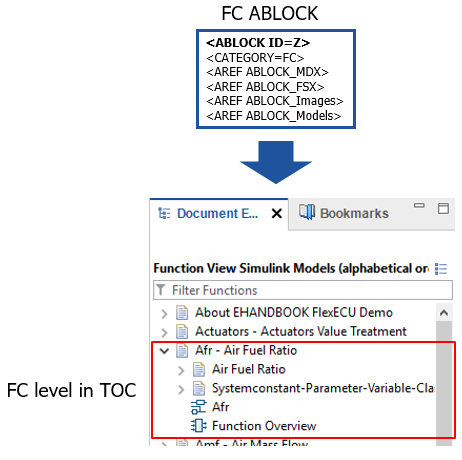
This is the building block of CCX file, which has the references to actual files, source of information for the container. Each of the FC has <SHORT-NAME>, <LONG-NAME>, <DESC> (description) and <CATEGORY>. The category name is FC. As a TOC entry, the content of the <DESC> tag is shown in EHB-NAV later.
A FC ABLOCK sample visualized in EHB-NAV Document Explorer:
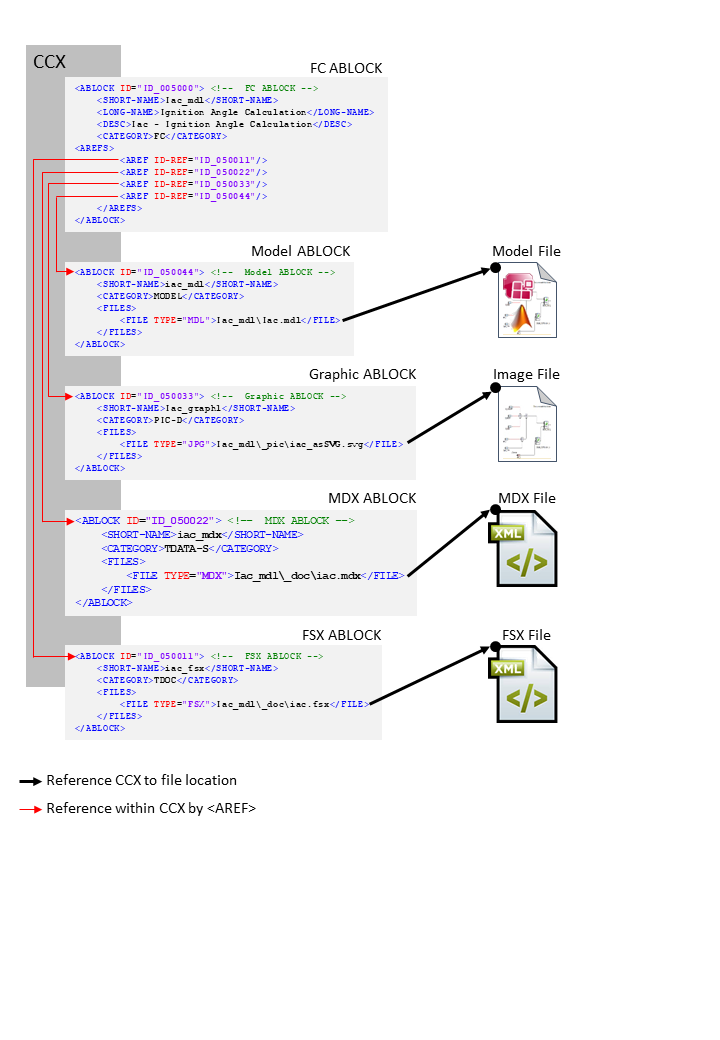
FC to Files Mapping
FC ABLOCK can refer to leaf ABLOCKs, which are defining the name and location of a file (1.-5.) or a function list for a function overview (6.):
-
MDX ABLOCK → path to MDX file
-
FSX ABLOCK → path to FSX file
-
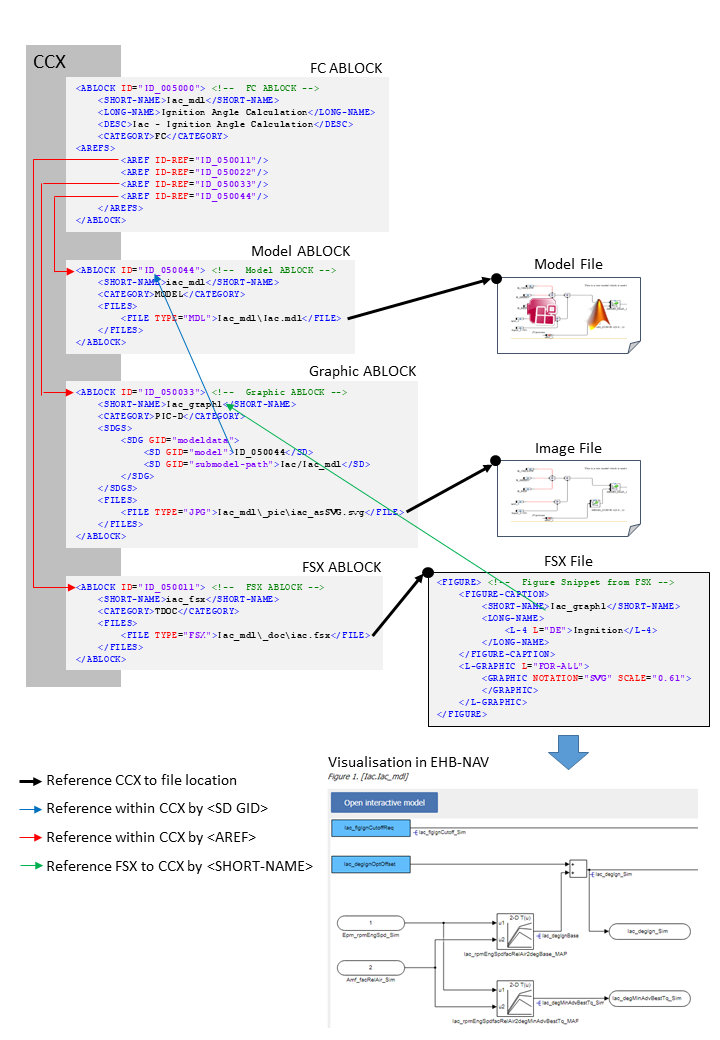
Graphic ABLOCK → path to a graphic file
-
References to static graphics
-
References to extracted graphics from model with some information about the path and sub-model path.
-
-
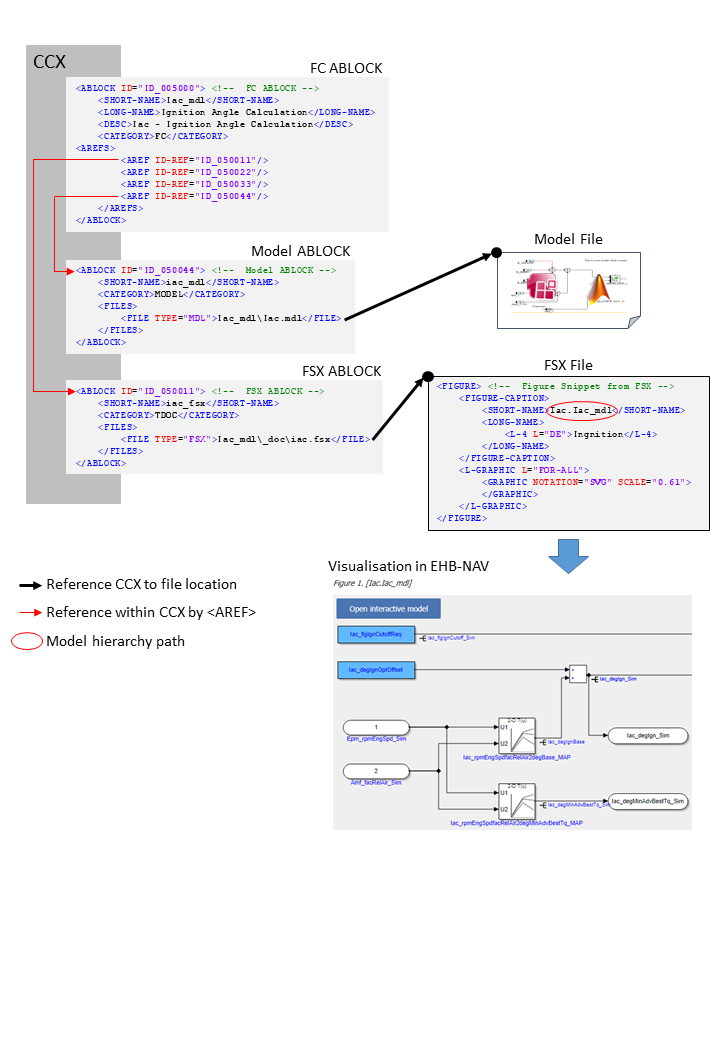
Model ABLOCK (AXL/MDL,SLX/C-CODE) → path to model file
-
Other ABLOCK → path to other files for that component like XDI file, CDF,..
-
Function Overview ABLOCK → list of FC names
|
All file paths specified in <FILE> must be relative to the CCX file! |
Referencing method between CCX and external files
<!-- FC ABLOCK -->
<ABLOCK ID="ID_005000">
	<SHORT-NAME>Iac_mdl</SHORT-NAME>
	<LONG-NAME>Ignition Angle Calculation</LONG-NAME>
	<DESC>Iac - Ignition Angle Calculation</DESC>
	<CATEGORY>FC</CATEGORY>
	<AREFS>
		<AREF ID-REF="ID_050011"/> (1)
		<AREF ID-REF="ID_050022"/> (2)
		<AREF ID-REF="ID_050033"/> (3)
		<AREF ID-REF="ID_050044"/> (4)
	</AREFS>
</ABLOCK>| 1 | Reference to FSX ABLOCK |
| 2 | Reference to MDX ABLOCK |
| 3 | Reference to Graphic ABLOCK |
| 4 | Reference to Model ABLOCK |
<!-- FSX ABLOCK -->
<ABLOCK ID="ID_050011">
	<SHORT-NAME>iac_fsx</SHORT-NAME>
	<CATEGORY>TDOC</CATEGORY>
	<FILES>
		<FILE TYPE="FSX">Iac_mdl\_doc\iac.fsx</FILE> (1)
	</FILES>
</ABLOCK>| 1 | Reference to FSX file |
<!-- MDX ABLOCK -->
<ABLOCK ID="ID_050022">
	<SHORT-NAME>iac_mdx</SHORT-NAME>
	<CATEGORY>TDATA-S</CATEGORY>
	<FILES>
		<FILE TYPE="MDX">Iac_mdl\_doc\iac.mdx</FILE> (1)
	</FILES>
</ABLOCK>| 1 | Reference to MDX file |
<!-- Graphic ABLOCK -->
<ABLOCK ID="ID_050033">
	<SHORT-NAME>Iac_graph1</SHORT-NAME>
	<CATEGORY>PIC-D</CATEGORY>
	<FILES>
		<FILE TYPE="JPG">Iac_mdl\_pic\iac_asSVG.svg</FILE> (1)
	</FILES>
</ABLOCK>| 1 | Reference to SVG file |
<!-- Model ABLOCK -->
<ABLOCK ID="ID_050044">
	<SHORT-NAME>iac_mdl</SHORT-NAME>
	<CATEGORY>MODEL</CATEGORY>
	<FILES>
		<FILE TYPE="MDL">Iac_mdl\Iac.mdl</FILE> (1)
	</FILES>
</ABLOCK>| 1 | Reference to Simulink model *.mdl file |
MDX ABLOCK Usage
MDX ABLOCK
Referred from: FC ABLOCK / Root ABLOCK
Refers to: none
<CATEGORY>TDATA-S or TDATA-PRO
FILE TYPE=”MDX”
<!-- MDX ABLOCK -->
<ABLOCK ID="ID_050022">
	<SHORT-NAME>iac_mdx</SHORT-NAME>
	<CATEGORY>TDATA-S</CATEGORY>
	<FILES>
		<FILE TYPE="MDX">Iac_mdl\_doc\iac.mdx</FILE>
	</FILES>
</ABLOCK>
In CCX, the FC ABLOCK is referring to its MDX file ABLOCK using AREF-ID (TDATA-S). There is also a global referring from the Root ABLOCK possible (TDATA-PRO). The relevant MDX file content is used for the model interface data and label information. To allow this, the <SHORT-NAME> of the FC ABLOCK must match to the SW-FEATURE <SHORT-NAME> in the MDX file. (Read more in chapter The MDX File Structure)
FSX ABLOCK Usage
FSX ABLOCK
Referred from: FC ABLOCK
Refers to: none
<CATEGORY>TDOC
FILE TYPE=”FSX”
<!-- FSX ABLOCK -->
<ABLOCK ID="ID_050011">
	<SHORT-NAME>iac_fsx</SHORT-NAME>
	<CATEGORY>TDOC</CATEGORY>
	<FILES>
		<FILE TYPE="FSX">Iac_mdl\_doc\iac.fsx</FILE>
	</FILES>
</ABLOCK>
In CCX, the FC ABLOCK is referring to its FSX file ABLOCK using AREF-ID. The FSX file content is then used for textual information. (Read more in chapter The FSX File Structure)
Graphic ABLOCK Usage
Graphic ABLOCK
Referred from: FC ABLOCK
Refers to: none
<CATEGORY>PIC-D
FILE TYPE=”EPS”, “PS”, “PDF”, “JPG”, “PNG”, “BMP”, “SVG”, “GIF”
<!-- Graphic ABLOCK -->
<ABLOCK ID="ID_050033">
	<SHORT-NAME>Iac.Iac_mdl</SHORT-NAME>
	<CATEGORY>PIC-D</CATEGORY>
	<SDGS>
		<SDG GID="modeldata">
			<SD GID="model">ID_050044</SD>
			<SD GID="submodel-path">Iac/Iac_mdl</SD>
		</SDG>
	</SDGS>
	<FILES>
		<FILE TYPE="JPG">Iac_mdl\_pic\iac_asSVG.svg</FILE>
	</FILES>
</ABLOCK>
The FILE TYPE has to match to the strings above. Later for further processing, the file format of the file itself is considered.
In CCX, the FC ABLOCK is referring to any graphic file ABLOCK using AREF-ID. The graphic is then embedded in the textual information. The ABLOCK may also contain the sub model path to an interactive model and a link to the model file via <SD GID=model”>ID (Read more in chapter Handling of Graphics in EHB)
|
File type PDF, PS or EPS images are processed as SVG image files. Remaining file formats are copied as is. |
Model ABLOCK Usage
Model ABLOCK
Referred from: FC ABLOCK
Refers to: none
<CATEGORY>MODEL
FILE TYPE ; (file extensions) =”AXL”; (.axl) / “SLX”; (.slx) / “MDL”; (.mdl) / “UGG”; (.ugg) / “C-CODE”; (.zip) (The zip should contain c and header files) /
”MATLAB”; (.zip)/”APP”; (.app)
<!-- Model ABLOCK -->
<ABLOCK ID="ID_050044">
	<SHORT-NAME>iac_mdl</SHORT-NAME>
	<CATEGORY>MODEL</CATEGORY>
	<FILES>
		<FILE TYPE="MDL">Iac_mdl\Iac.mdl</FILE>
	</FILES>
</ABLOCK>
In CCX, the FC ABLOCK is referring to its model file ABLOCK using AREF-ID. The model file is then converted into an interactive model. The model ABLOCK ID may also be referred from a graphic ABLOCK. (Read more in chapter Reference Model with User provided Graphic)
CDF ABLOCK Usage
CDF ABLOCK
Referred from: FC ABLOCK or Root ABLOCK +
Refers to: none
<CATEGORY>TDATA
FILE TYPE=”CDF”
<!-- CDF ABLOCK -->
<ABLOCK ID="ID_00004">
	<SHORT-NAME>globalCdfCdfx</SHORT-NAME>
	<LONG-NAME>globalCdfCdfx longname</LONG-NAME>
	<CATEGORY>TDATA</CATEGORY>
	<FILES>
		<FILE TYPE="CDF">_global\CDM.CDFX</FILE>
	</FILES>
</ABLOCK>
In CCX, the FC ABLOCK is referring to its CDF file ABLOCK using AREF-ID. There is also a global referring from the Root ABLOCK possible. The CDX file content is then used to show the values of parameters and system constants in EHB-NAV.
LIB ABLOCK Usage (For ASCET only)
LIB ABLOCK
Referred from: Root ABLOCK +
Refers to: none
<CATEGORY>LIB
FILE TYPE=”DIR”
<!-- LIB ABLOCK -->
<ABLOCK ID="ID_000001">
	<SHORT-NAME>Services_ID1</SHORT-NAME>
	<LONG-NAME>Global model library</LONG-NAME>
	<CATEGORY>LIB</CATEGORY>
	<FILES>
		<FILE TYPE="DIR">..\LibDir</FILE>
	</FILES>
</ABLOCK>
In CCX, the Root ABLOCK is referring to its LIB folder ABLOCK using AREF-ID. The library folder points to a root directory folder structure, which is containing global library files, used in all ASCET models. (Read more in chapter ASCET Model Reference to global Library and other Sub-Components)
Function Overview ABLOCK Usage
Function Overview ABLOCK
Referred from: FSX by FIGURE-SHORT-NAME
Refers to: FC SHORT-NAME in MDX
<CATEGORY>PIC-FO
<SDG GID=“function_overview”
<!-- Function Overview ABLOCK -->
<ABLOCK ID="EpmXfn">
	<SHORT-NAME>Epm Function Overview</SHORT-NAME>
	<CATEGORY>PIC-FO</CATEGORY>
	<SDGS>
		<SDG GID="function_overview">
			<SD GID="component">Epm</SD>
		</SDG>
	</SDGS>
</ABLOCK>
This ABLOCK defines a list of FCs by using the <SD GID=”component”>FC_Name tag. The <SHORT-NAME> of the ABLOCK should correspond to the FIGURE’s <SHORT-NAME> in FSX. In addition, the <SD GID FC_Name> should match to the corresponding SW-FEATURE <SHORT-NAME> in MDX. This will allow a function overview graphic at this FSX location in EHB-NAV. (Read more in chapter Function Overview Graphic)
ARXML ABLOCK Usage
As an alternative to MDX, EHB-CB supports AUTOSAR Classic meta-data information as input. Here function interface descriptions has to be defined in an AUTOSAR file (.arxml), which then has be referenced in the catalog file (CCX).
 ARXML ABLOCK
Referred from: Root ABLOCK
 Refers to: ARXML containing Software interface declaration, Components, Compositions
 <CATEGORY>SWCompo
 FILE TYPE=”ARXML”
Create an ABLOCK with category SWCompo, which references to .arxml file(s) containing function interface description. Add reference to the created ABLOCK from main ABLOCK for the EHB Container
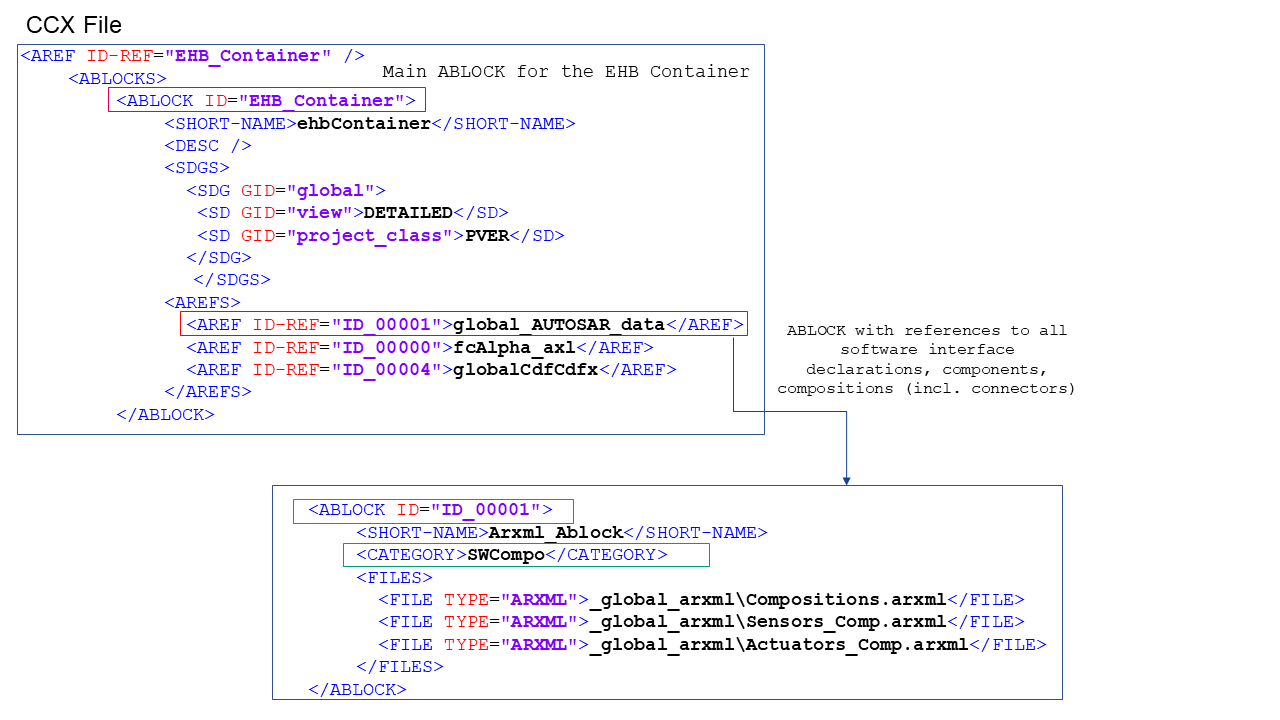
Alternatively AUTOSAR data (in the form of ARXML)can be referenced from a component to which it belongs.
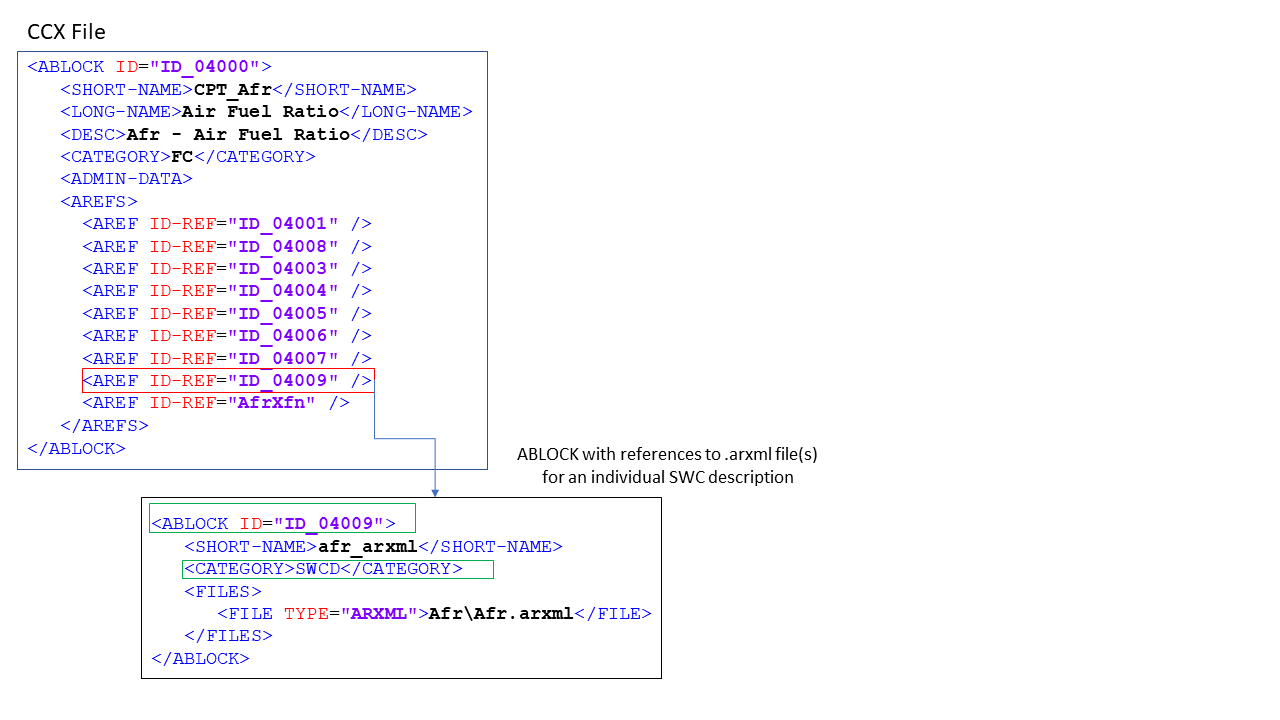
 ARXML ABLOCK
Referred from: Component ABLOCK
 Refers to: ARXML containing Software interface declaration, Components, Compositions
 <CATEGORY>SWCD
 FILE TYPE=”ARXML”
Create an ABLOCK with category SWCD, which references to .arxl file(s) containing function interface description. Add reference to the created ABLOCK from docu unit (component). Finally reference the docu unit in main ABLOCK for EHB container
<!-- MDX ABLOCK -->
<ABLOCK ID="ID_050022">
	<SHORT-NAME>iac_mdx</SHORT-NAME>
	<CATEGORY>TDATA-S</CATEGORY>
	<FILES>
		<FILE TYPE="MDX">Iac_mdl\_doc\iac.mdx</FILE>
	</FILES>
</ABLOCK>
In CCX, the FC ABLOCK is referring to its MDX file ABLOCK using AREF-ID (TDATA-S). There is also a global referring from the Root ABLOCK possible (TDATA-PRO). The relevant MDX file content is used for the model interface data and label information. To allow this, the <SHORT-NAME> of the FC ABLOCK must match to the SW-FEATURE <SHORT-NAME> in the MDX file. (Read more in chapter The MDX File Structure)