How to Annotate Values from A2L/HEX/DCM/CDF Files
Procedure
The values for Scalar Parameters and System Constants are annotated to the
Model Viewer (like live data from INCA and data from measurement files). This
helps to understand more easily on how an ECU function is calibrated.
EHANDBOOK-NAVIGATOR takes the values from the loaded A2L (*.a2l), HEX
(*.hex, *.s19) or DCM (*.dcm)/CDF (*.cdfx)/PaCo (*.xml) files.
The Display Value (Display all values)/Hide Value (Hide all values) shows or hides
the values.
To annotate the values:
Firstly, load the A2L, HEX, DCM/CDF/PaCo files as below:
-
Go to
Datamenu →Measurement and Calibration Files.
Measurement and Calibration Filesdialog box is displayed. -
Select the A2L, HEX, DCM/CDF/PaCo files and click
Load.
The selected A2L, HEX, DCM/CDF/PaCo files are loaded.
Then, annotate the values for Scalar Parameters and System Constants by any of the following methods: -
Right-click on a label in the Interactive Model/Function Overview Diagram.
A context menu is displayed. -
Click
Display Value.
<Or> -
Click
Display all valuesin the Status bar.
<Or> -
Go to
Datamenu, selectDisplay all Values.
The values are annotated in the Model viewer based on the values feeded in the respective A2L, HEX, DCM/CDF/Paco files.
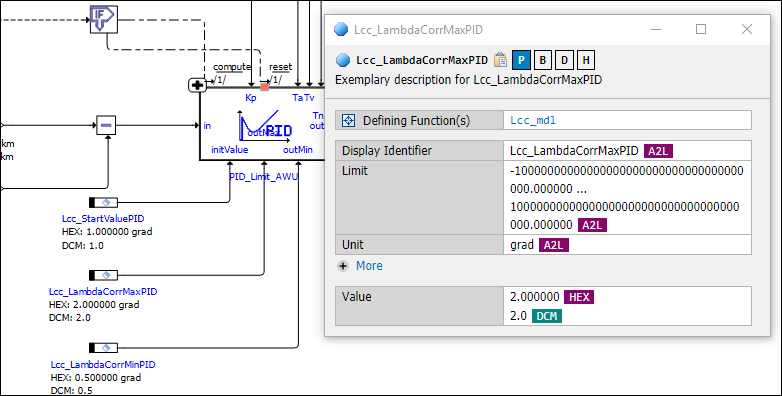
Annotation of values.
On the same way, you can also hide all the displayed values.
|
The "Find in current tab" feature will not search the annotated values. |