What’s New
Version 14.4 (October 2026)
EHANDBOOK Container-Build 14.4.0 - What’s New & Release Overview
Welcome to EHANDBOOK Container-Build version 14.4.0! This release introduces several new capabilities and enhancements, including support for AI permission metadata in encrypted EHANDBOOK containers, enhanced Goto and From block support, UGG generation for Simulink model ZIP packages containing required C header files, equation support in Simulink annotation blocks, and n-ary operators for improved visualization of C-code-generated interactive models.
-
New Feature: AI Allowance for Encrypted EHANDBOOK Containers
-
New Feature: Support UGG Generation for Simulink Model ZIPs Containing Required C Header Files
-
New Feature: Rendering Support for Stateflow Entry and Exit Ports
-
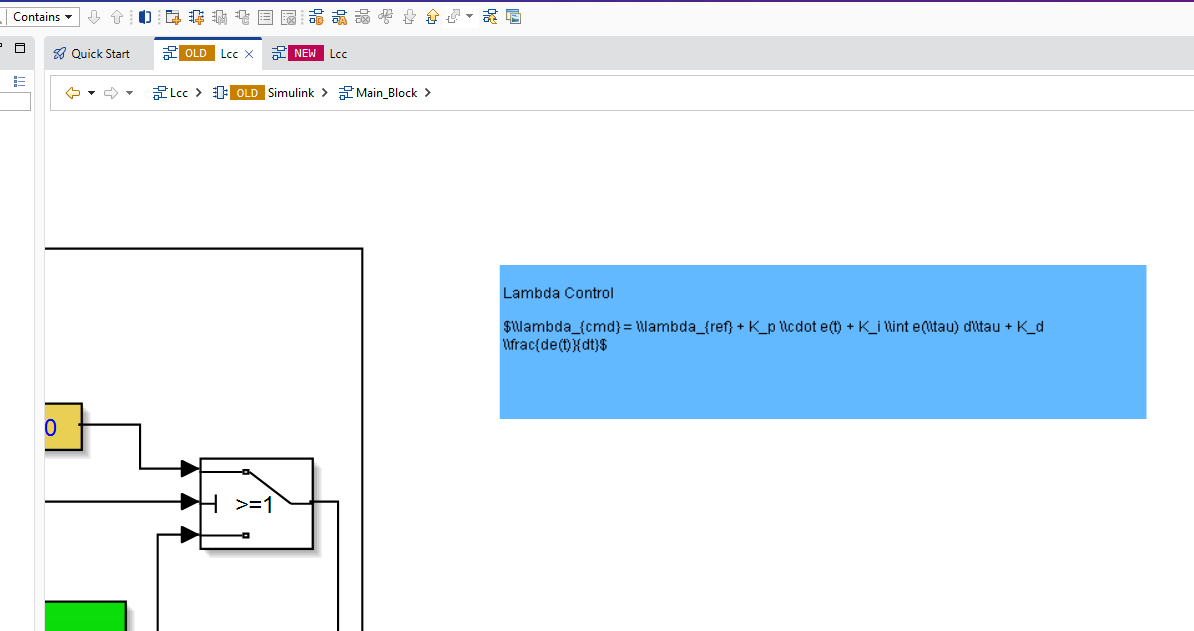
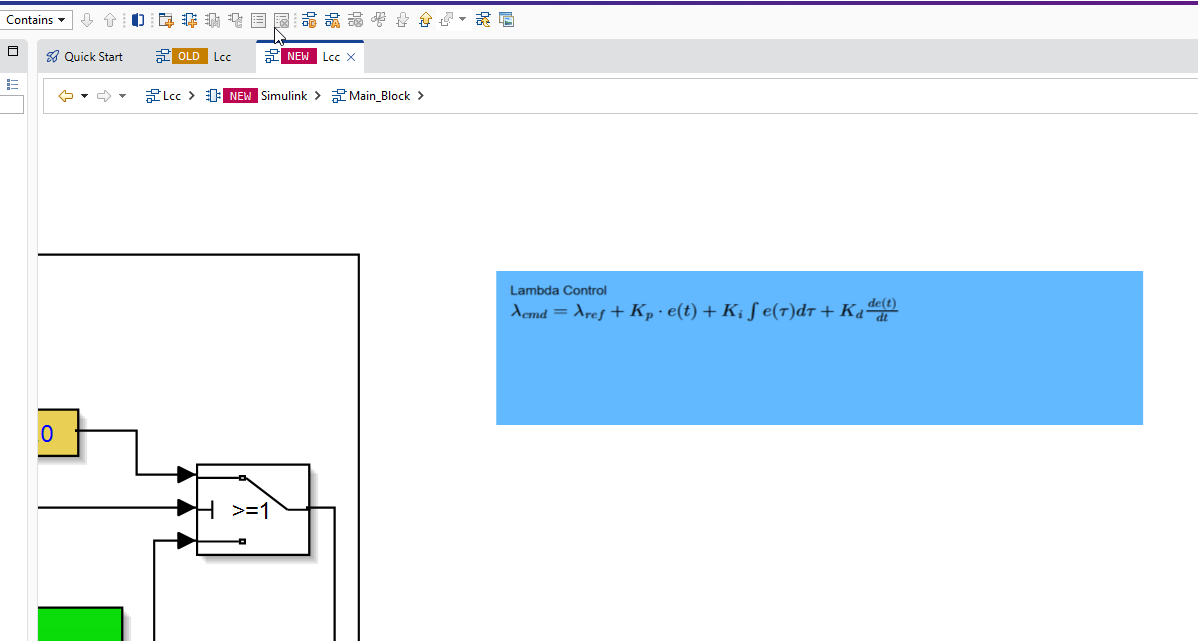
New Feature: Support LaTeX Equations in Simulink Annotation Blocks
-
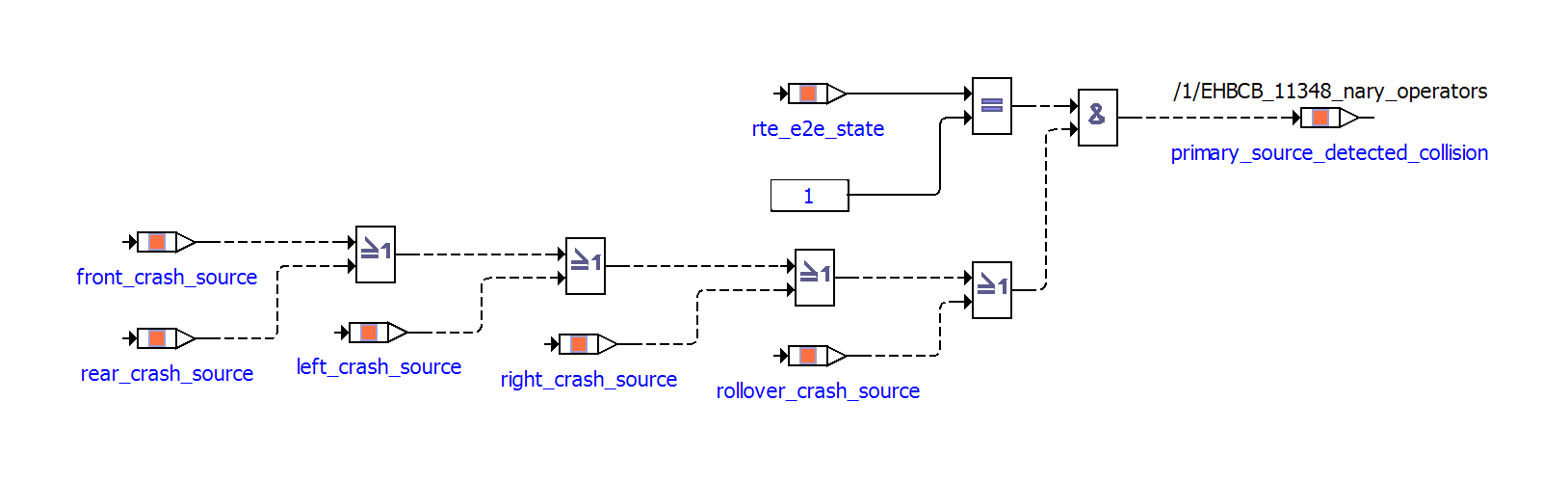
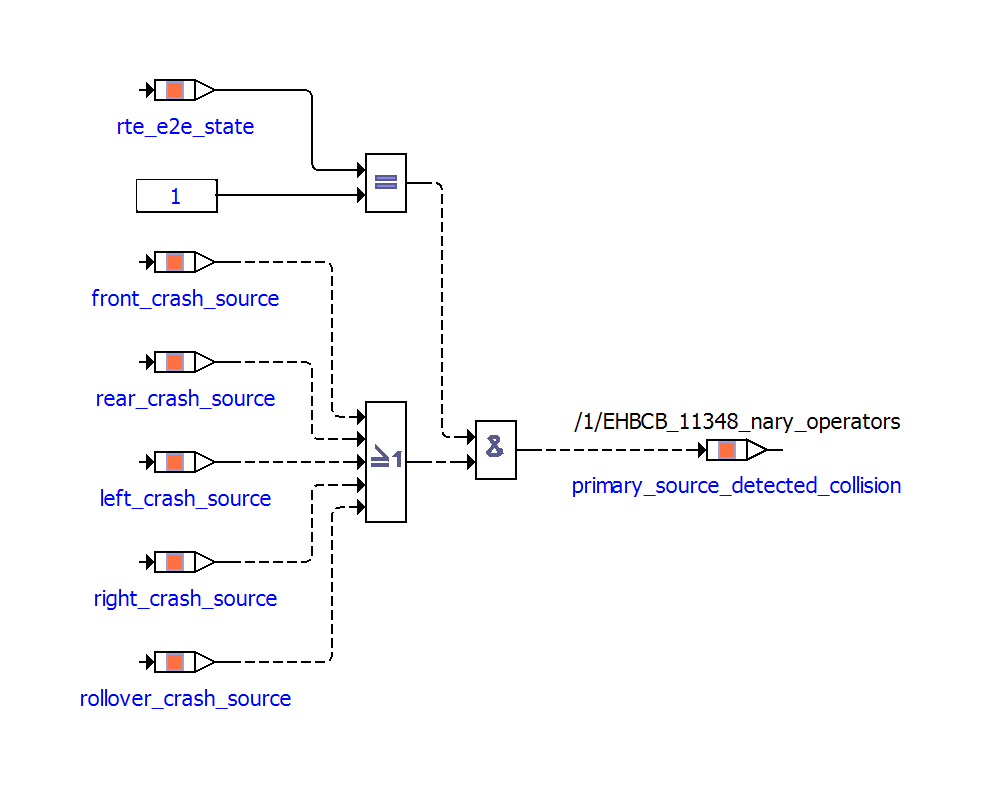
Enhancement: Support N-ary Operators for Improved Visualization of C-Code Models
AI Allowance for Encrypted EHANDBOOK Containers (New Feature)
As part of the IP Protection Control for EHANDBOOK initiative, Container Build introduces support for a new -allowai parameter to enable controlled AI usage for encrypted EHANDBOOK .ehbcrypt containers.
The -allowai parameter can be used when generating new encrypted containers or repackaging existing encrypted containers.
For detailed information about the -allowai parameter and supported use cases, see AI Allowance for Encrypted EHANDBOOK Containers.
Support UGG Generation for Simulink Model ZIPs Containing Required C Header Files (New Feature)
UGG now supports Simulink model ZIP packages that contain required C header (.h) files. This enables UGG to generate the required images and artifacts without requiring users to manually remove header files from the model package.
When both Simulink and C-code files are present in the ZIP package, Simulink takes precedence during processing.
Rendering Support for Stateflow Entry and Exit Ports (New Feature)
EHANDBOOK Container-Build now supports rendering of Entry and Exit ports in Stateflow models. Entry and Exit ports are used in Simulink subsystems to define signal boundaries - Entry ports receive signals into a subsystem, while Exit ports send signals out of a subsystem.
With this enhancement:
-
Entry and Exit ports are now correctly rendered in the interactive model view in EHANDBOOK Navigator.
-
Port labels are displayed consistently with the Simulink model.
Support LaTeX Equations in Simulink Annotation Blocks (New Feature)
LaTeX equations (formulas) in Simulink annotation blocks are now rendered in EHANDBOOK with an appearance similar to Simulink. Equation rendering is supported in both PDF documents and KAOM-based interactive model views.
| Before | After |
|---|---|
|
|
Enhanced Simulink Goto and From Block Support (Enhancement)
EHANDBOOK now provides enhanced navigation between related From and Goto blocks in Simulink models. You can navigate directly between related blocks using the Navigate to Related Blocks feature available from the context menu and toolbar. The enhancement supports navigation from a Goto block to its related From blocks and from a From block back to its source Goto block. The related blocks are displayed in a Related Blocks list, making it easier to identify and access the corresponding blocks in large Simulink models. When you select a related block, EHANDBOOK Navigator automatically opens the required subsystem hierarchy and highlights the selected block in the model.
For more information, see Enhanced Simulink Goto and From Block Support.
Support N-ary Operators for Improved Visualization of C-Code Models (Enhancement)
C-Code visualization is enhanced to represent chains of compatible associative operators as a single multi-input operator block in generated interactive models.
For example, expressions such as a || b || c || d, a && b && c && d, a + b + c + d, and a * b * c * d are shown as one operator block with multiple input ports instead of several cascaded binary operator blocks.
This reduces diagram depth and makes C-Code-generated interactive models easier to read and navigate.
primary_source_detected_collision =
    (rte_e2e_state == 1) &&
    (front_crash_source ||
     rear_crash_source ||
     left_crash_source ||
     right_crash_source ||
rollover_crash_source);| Before | After |
|---|---|
|
|
For more information, see Configure C-Code visualization.
C-Code Simplification Improvements (Enhancement)
C-Code model rendering has been enhanced to improve the simplification of complex C-code expressions and access patterns, resulting in clearer and more meaningful representations in generated EHANDBOOK containers. The enhancements improve support for complex struct and pointer access patterns, including nested structures, pointer dereferencing, and function arguments. This helps provide a more accurate and readable representation of C-Code while reducing unnecessary complexity in the resulting model.
UGG Generation for C-Code (Enhancement)
The Unified Graphics Generator (UGG) now supports C-Code as an input for generating SVG images. UGG can pre-generate interactive models, SVG images, and map files from Simulink and ASCET models. With this enhancement, SVG images can also be generated from C-Code, enabling C-Code-based graphics to be pre-generated and consumed by the EHB-CB during container generation.
Version 14.3 (August 2026)
EHANDBOOK Container-Build 14.3.0 - What’s New & Release Overview
Welcome to EHANDBOOK Container-Build version 14.3.0! This release brings significant enhancements to Simulink model visualization, AUTOSAR integration capabilities, and AsciiDoc documentation rendering.
Simulink Line Shapes & Annotation Support (Enhancement)
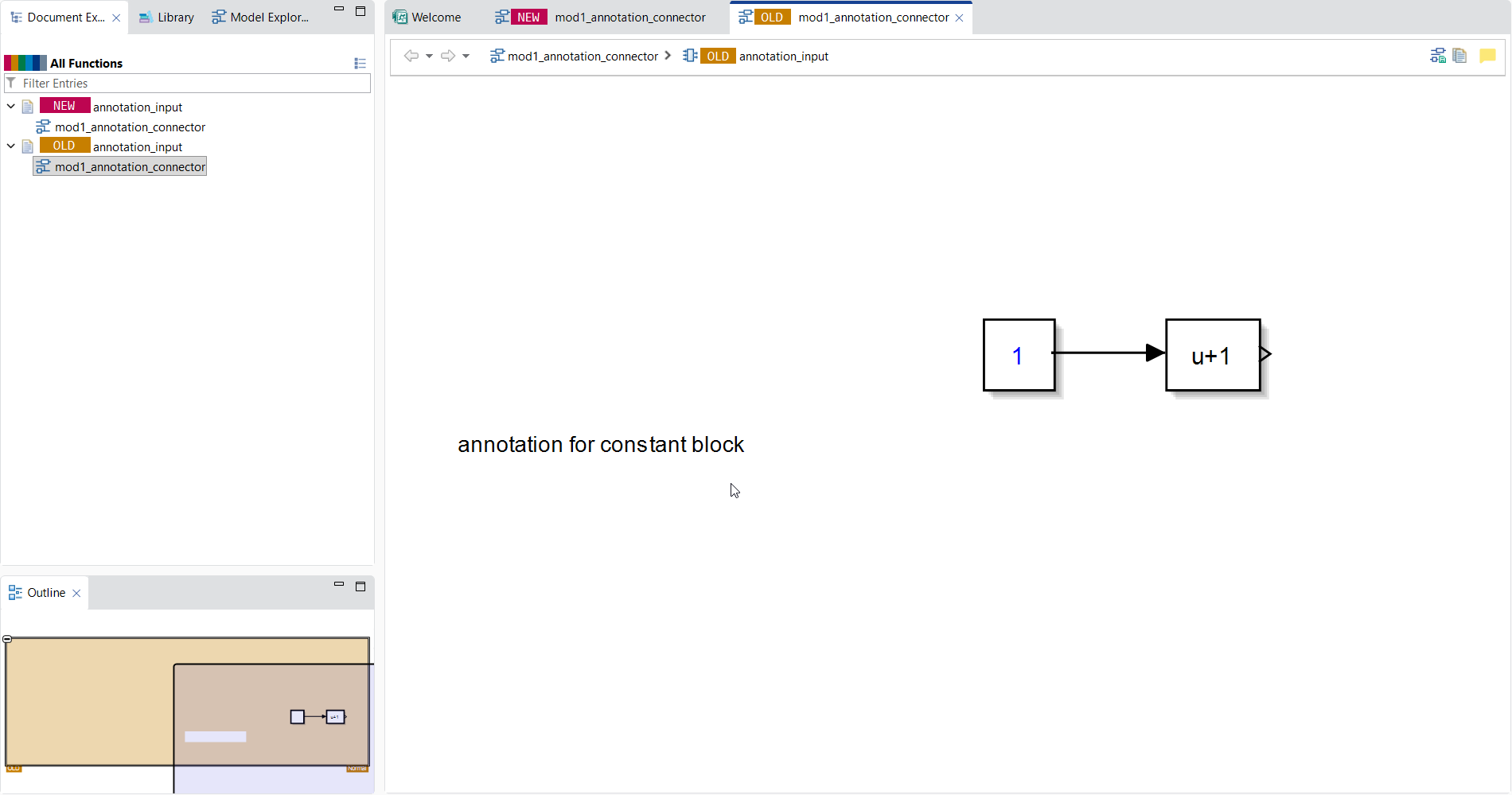
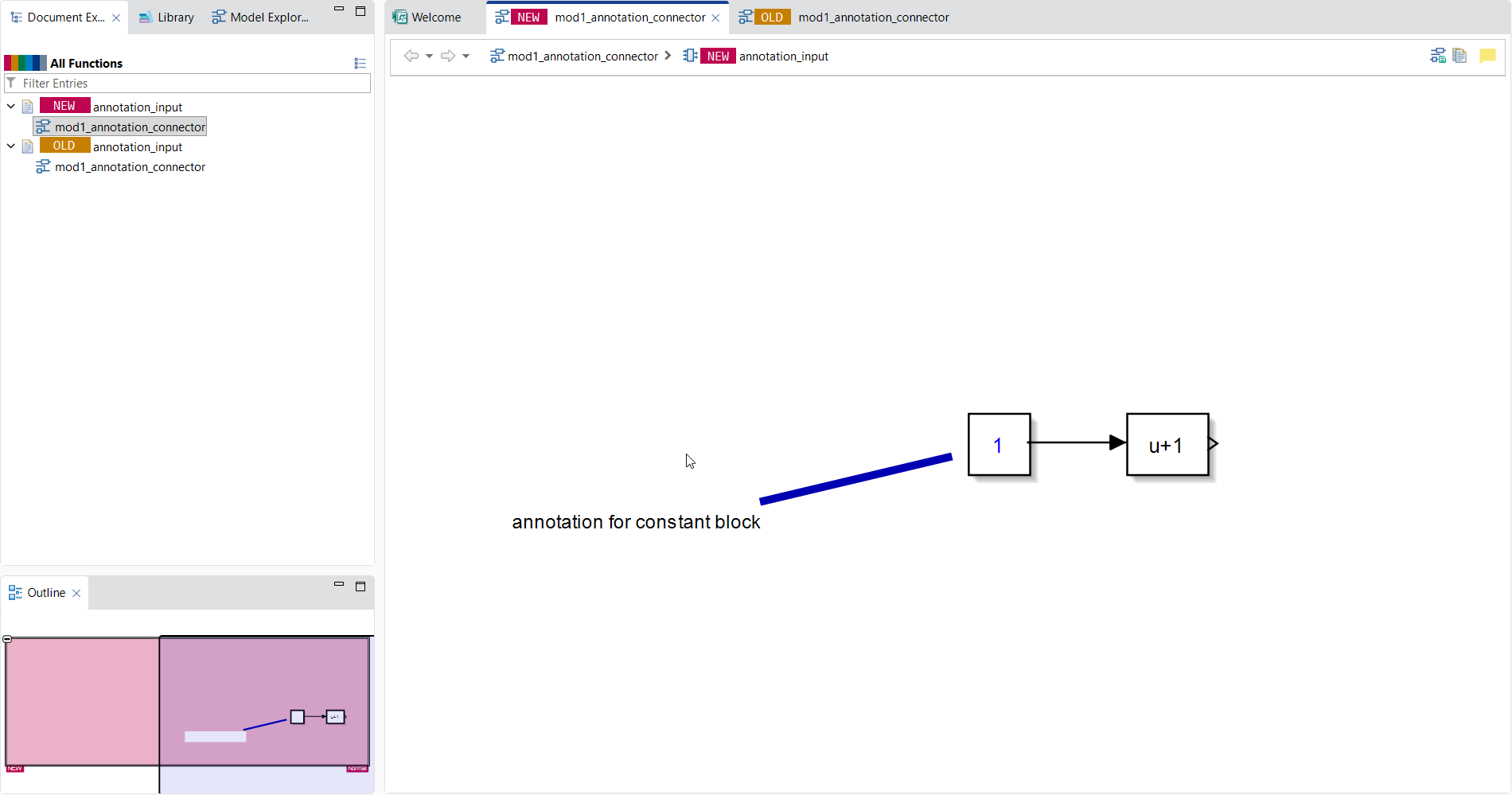
Enhanced model visualization in EHandbook Navigator (EHB-NAV) to correctly render custom annotation line connections, line formatting (color and thickness), and Simulink line shapes even when Annotation blocks contain tables or share identical names.
Example: The Flex ECU demo container has been updated with a Simulink line shape example in the AFR FC to demonstrate this capability.
| Before | After |
|---|---|
|
|
Searchable Mask Text (Improvement)
Expanded the mask decoration algorithm to support disp() command on Simulink masked blocks, making descriptive text on blocks fully searchable and clickable within EHB.
Active Variant Subsystem Connections
Improved support for Variant Subsystems by establishing proper signal connections to active variant choices, ensuring signal highlighting and navigation function correctly.
ECU Abstraction Component Support
Extended Container-Build support to import, process, validate, and generate containers for AUTOSAR ECU Abstraction Application components (ECUAbstractionSwComponentType) without manual workarounds.
Shared Parameters in Parameter Tables
Enhanced EHB parameter tables to parse ARXML, identify shared parameters (ParameterDataPrototype) referenced across multiple modules, include them alongside local parameters, and clearly distinguish their origin and defining context.
Text Formatting & Styling
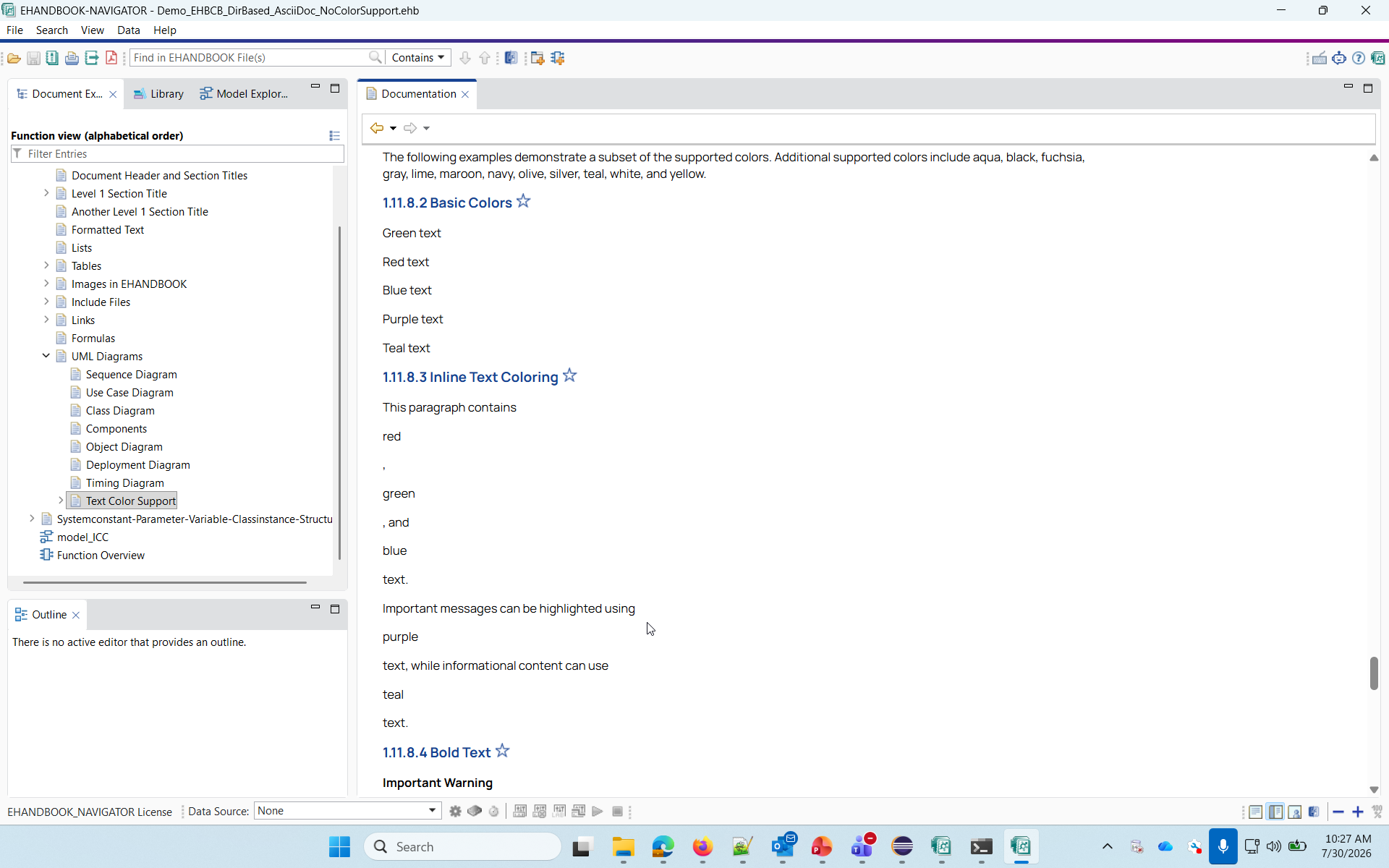
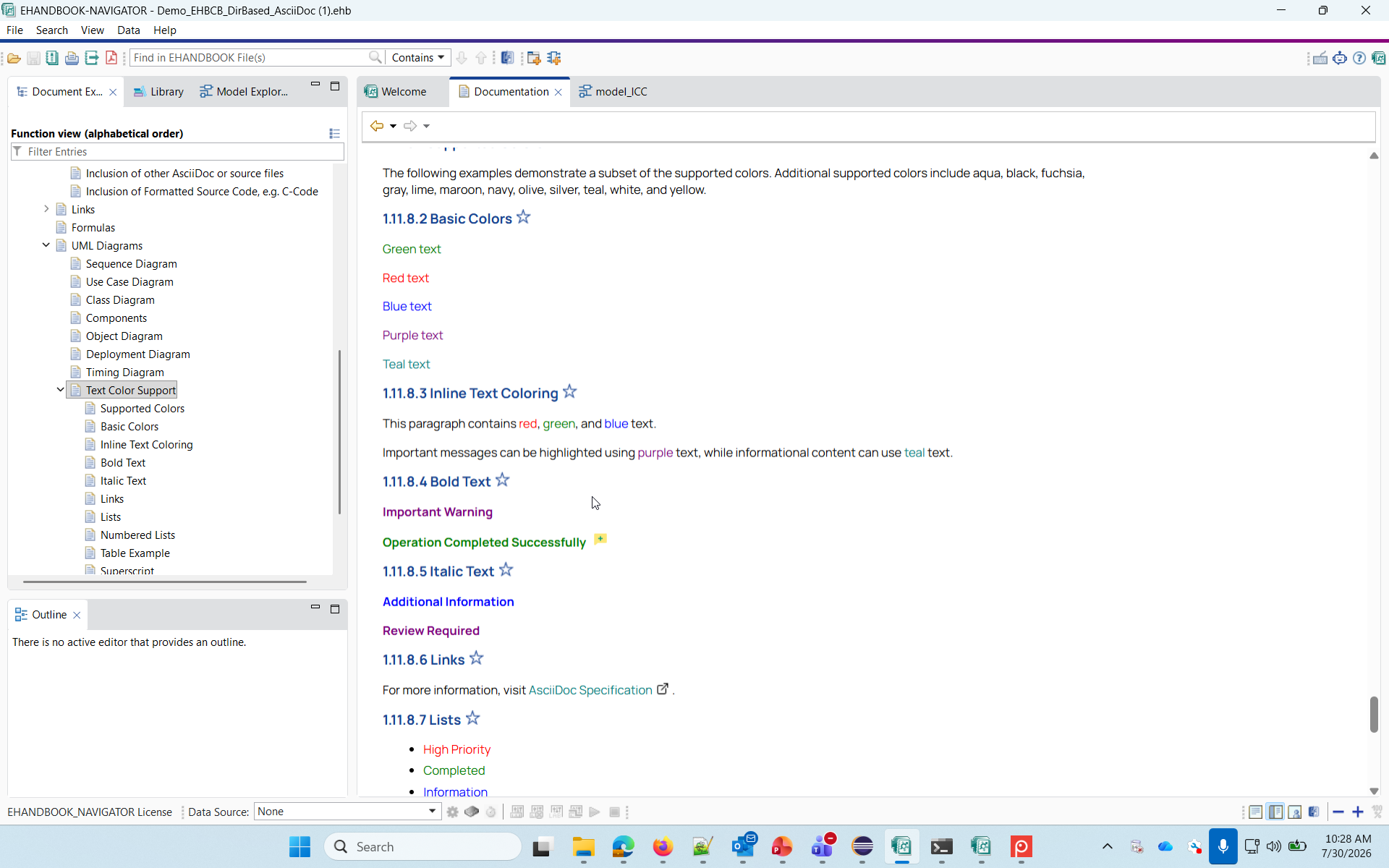
Added robust support for text color styling and underline formatting in AsciiDoc documents, ensuring warnings, highlights, and custom-styled notes maintain proper visual hierarchy. This enhancement improves documentation readability while maintaining compatibility with supported AsciiDoc formatting.
For additional information, refer to Text Color Support
GitHub demo: https://github.com/EHANDBOOK/ehandbook-cb-demos/tree/master/Demo_EHBCB_DirBased_AsciiDoc/Output
| Before | After |
|---|---|
|
|
Improved Rendering of Commented Simulink and Stateflow Elements
Rendering of commented Simulink and Stateflow elements has been enhanced in EHANDBOOK Navigator. Commented blocks, states, transitions, signal lines, and labels are now consistently displayed in gray-out mode, improving visual consistency with the MATLAB/Simulink editor and making inactive model elements easier to identify. For additional info, Rendering of Commented Simulink and Stateflow Blocks
Custom Table CSS Classes
Support for custom table CSS classes has been added. Predefined classes such as .custom-table-input, .custom-table-output, .custom-table-constants, and .custom-table-calib are available with default styling and can be overridden in commonltr.css using the -styling option. Users can also define and apply their own custom table classes for additional styling flexibility.
For additional information, refer Advanced Table
Extended Support for MATLAB 2024b and 2025b Blocks
EHANDBOOK now supports additional blocks introduced in MATLAB 2024b and 2025b. Support has been added for the following blocks:
simulink/Matrix Operations/Array Processing Subsystem simulink/Matrix Operations/Expand Scalar simulink/Matrix Operations/Pixel Processing Subsystem simulink/User Defined Functions/Python Code
This enhancement improves compatibility and integration with newer MATLAB/Simulink model features.
Enhanced Container Health Report Visualization
The HTML Log Analyzer health summary has been enhanced with a graphical health report for improved readability and quicker analysis of container conversion quality.
The updated report replaces the previous numeric-only health score with a color-coded visualization that highlights conversion success, warnings, and errors in a more intuitive format. The report now provides a clearer overview of overall container health and conversion status.
For details please refer HTML Enhancements.
Documentation Update: Command Line Argument Change
-
Using the CLI parameter "-includeSourceCode", EHANDBOOK Container-Build can integrate code artefacts from various sources into EHANDBOOK Container files. In previous versions, ESDL code blocks from ASCET models as well as code listings within Simulink blocks (e.g., S-functions) were supported. With EHANDBOOK 14.2.0, also C-Code sources are supported. In the Document Explorer, code artefacts will be shown as part of the documentation unit they belong to. Their content is shown in the Code Viewer of EHANDBOOK-NAVIGATOR.
-
The command line option "-includeMatlabFunctionCode" is no longer supported. Use "-includeSourceCode" instead. For details on the supported command line arguments and usage examples, refer EHANDBOOK Container-Build CLI Parameters.
Version 14.1 (March 2026)
HTML Container Report
A new HTML-based log report is generated by default after container creation, providing a comprehensive view of container information, health metrics, and detailed logs. It enables easy analysis of errors, warnings, broken images, and affected documentation units with search and filtering capabilities.
For details please refer HTML Container Report section.
Support for mask parameters in Simulink Constant blocks
Introduced support for exposing the Constant value of Simulink Constant blocks as a mask parameter in EHANDBOOK. With the mask parameter name set to Value, the block becomes interactive, allowing users to view the configured value in a label popup and search for it.
For details please refer Support for mask parameters in Simulink Constant blocks section.
Support for MATLAB 2025b Models in EHB
EHB now supports models created with MATLAB 2025b. As part of this update, compatibility with applications and toolbox has been verified, rendering behavior for new blocks has been validated, and mask image generation scripts have been updated accordingly. New blocks introduced in MATLAB 2024b and 2025b have been analyzed and are being supported to ensure improved integration with EHB.
|
Current limitations: The following blocks are currently not supported:
|
Support for Removing Broken Images in Directory-Based Products
Extended support for hiding/removing broken images to directory-based products, enabling consistent behavior across product types using -DremoveBrokenImageForViewName in .ini file.
Improved Function Instance Naming for C-Code
Updated the naming convention for multiple calls to the same function within a C-Code model. Previously, repeated function calls were numbered using parentheses (for example, setClearTopologyError (3)), which could resemble function calls with arguments in C code.
This enhancement introduces a clearer naming format using underscores (for example, setClearTopologyError_3), following the pattern <function_name>_<count> to improve readability and avoid ambiguity.
Version 14.0 (January 2026)
Chapter Numbering in PDF
PDF documents now include clear chapter numbering to improve navigation and readability. Chapters are automatically numbered, and the Table of Contents is accurately aligned with the chapter structure, making it easier to find and move between sections.
Multi-Container AUTOSAR Function Connectivity
The Function Overview now provides improved visualization when working with multiple AUTOSAR containers. Functions across different containers are correctly connected, ensuring that signal flow is displayed accurately whenever valid connections exist. This makes it easier to understand system behavior and interactions across containers.
Improved Array Label Support for C-Based Workflows
Working with array variables in C is now simpler and more reliable. Array-based signals are correctly handled as single logical labels during A2L generation, ensuring accurate label mapping and seamless use in calibration and measurement tools such as INCA. This enhancement makes it easier to distinguish and work with multiple arrays, improving overall efficiency in C-based workflows.
Container-Build Demos Available on GitHub
The Container-Build demos are now hosted on GitHub to make them available to customers for better understanding of supported use cases. The demos can be accessed and downloaded from the following repository: https://github.com/EHANDBOOK/ehandbook-cb-demos
Version 13.5 (November 2025)
TOC Generation Support for System Constants (ARXML)
It is now possible to generate a Table of Contents (TOC) entry for System Constants directly from ARXML metadata.
This can be enabled by adding the argument -DgenerateSystemConstants to the product’s .ini file.
For details please refer option for system constants section.
|
Currently, only the following value specification types under
Support for additional specification types in ARXML will be introduced in future releases. |
Support for Port Positioning on Rotated Masked Blocks
EHANDBOOK now supports Simulink’s configurable port positioning behavior for masked blocks when rotated. The port order and layout are now consistent with Simulink, ensuring accurate visual alignment.
| For masked blocks with images, port clickability is currently not supported. |
Support for Unique Label Names in C-Code Based Models
It was previously possible to assign unique names to labels of C-Code based models through label configuration, but these names were not searchable. The unique label names are now supported in global search, enabling easier navigation and lookup within C-Code based models.
Improved Documentation for C-Code Converter
Comprehensive documentation is now available for setting up and configuring the C-Code Converter. The updated guide includes detailed explanations of configuration options (CCodemeta), recommended folder structures, and handling of shared libraries. It also provides clarifications on SWAN debug log terminology and practical examples to help users configure and run the converter efficiently. Please refer: Setting up Library Folder, CCode Configuration, SWAN Debug Logs
Version 13.4 (October 2025)
Manage system constants across Excel, A2L, and MDX files seamlessly
-
EHB now supports System constants from A2L formats, not just MDX and excel files. This means you can work with system constants in the same file format as your variables and calibration parameters, making your workflow more consistent and efficient. The feature includes automatic documentation generation and can be enabled when needed.
-
The system automatically creates a Table of Contents for all your system constants, making them easier to find and navigate. You can turn this feature on by adding "-DgenerateSystemConstants" to your configuration file when you need it. By default, the feature is disabled to avoid affecting existing projects—you can enable it when needed.
Visualization improvement in C-Code models
Previously, C-Code models only showed numeric values for system constants, making code review and debugging very difficult since engineers couldn’t easily identify what each constant represented. Now the system has been improved to provide better readability and user experience:
-
Descriptive Names Displayed: System constants now show meaningful names like "ENGINE_IDLE_SPEED" instead of cryptic numbers like "0x1A2B"
-
Original Values Still Accessible: Numeric values remain available through convenient label popup functionality
Jump to meaningful Model Layers in ASCET and Simulink
Models often include multiple empty wrapper layers that add no useful information. Now you can configure the system to automatically skip these empty layers and start viewing your model from the first level that actually has content. This saves screen space and gets you to the important parts faster. Please refer Root Level Jump
Processing large C-Code files is faster than before
Previously, generating C-Code for large files created major bottlenecks and slowed development workflows sometimes forcing teams to wait hours or even days for results. We’ve now implemented substantial performance improvements that deliver dramatic speed increases. With the new performance improvements, container generation time is now 50–90% faster, depending on the size of the library files.
👉 For example, a process that once took 20 hours may now complete in just 1–5 hours.
Version 13.3 (July 2025)
Support for Hierarchical State Machine Diagram Image Generation in UGG and CB
-
EHB now supports generating SVG images for individual ORSTATE blocks and group states within Simulink Stateflow charts. Users can now expand these states to view and document their internal Simulink content. This enhancement enables seamless navigation and visual representation—mirroring MATLAB behavior.
-
The generated SVG images can be used in documentation, and the Open Interactive Model button continues to function as expected.
-
This feature is supported in both Container Build (CB) and UGG workflows.
Performance Optimization in Container Generation
-
The internal architecture has been refined to deliver substantial improvements in processing speed and overall efficiency during container generation. These optimizations reduce build time without altering functional behavior or output quality. Further performance enhancements are planned and can be expected in upcoming releases.
Version 13.2 (June 2025)
Support for System Constants
-
A new sheet has been added to the supported Excel structure to include System Constants. These constants are now recognized as part of the model interface data and are incorporated into the internal meta-data database within the EHANDBOOK Container. Please refer Excel Format Specification
Exclude C-Code Functions via Global View JSON
-
C-Code functions (e.g., printf, logging/debug routines) can now be excluded from the interactive model by listing them in a Global View JSON file, using the -globalViewFile option in CB and UGG. Please refer Exclude C Code functions
Merging of CB and UGG Packages into EHB_CB Software
-
Starting with this release, the CB (Container Build) and UGG (Unified Graphic Generator) packages have been merged into a single package. Both executables are now included within the EHB_CB download software. There is no change in functionality — all existing features and workflows remain unaffected. This change is aimed at simplifying distribution and ensuring better consistency between components.
Version 13.1 (April 2025)
Enhanced Label Configuration for ASCET Models
-
EHB-CB allows label configuration to control the inclusion of class instance names in element names within ASCET models. You can choose to either retain or remove class instance names, enabling cleaner and more customizable element naming based on your project needs. Please refer Label Configuration
Version 13.0 (March 2025)
Customizable Label Configuration in CCode Models
-
EHB-CB allows adding configurable and invisible label names to blocks using exact or pattern-based replacements defined in the label configuration JSON file. Label Configuration
Customizable Label Configuration in Simulink Models for connections
-
EHB-CB provides the ability to define customizable label names for connections in Simulink models. Labels can be assigned based on exact connection names or pattern-based rules, ensuring clarity and consistency in model representation. These configurations can be managed through the label configuration JSON file, allowing flexibility in defining naming conventions. Label Configuration
Support for ++ && — (Increment and Decrement Operator) in C Code Conversion
EHB-CB now supports the ++ & --(increment and decrement operator) during C code conversion. This enhancement improves code readability, efficiency, and alignment with standard C Code.
Version 12.3 (October 2024)
UGG support for variant reduced Simulink models
When there are multiple SIMULINK model files within a zip file input, "-DsimulinkModelFileSuffix" option allows name matching with the desired model file within the zip by ignoring the provided suffix from the model file names and matching the name against the zip file name. Refer to Name matching for SIMULINK model files with suffix
Version 12.2 (September 2024)
Extension of label configuration to allow one to one mapping
EHB-CB provides an option to add configurable and invisible label names to blocks for Simulink, ASCET and ASCET-DEVELOPER models. Label names can be assigned directly based on the block names (Exact replacement) or based on block name patterns (Pattern-based replacement). These replacement rules can be defined under the keyword "Common" in the label configuration JSON file.refer to One to one mapping using label configuration
Support for Description List, Mixing list and Nested Description list
A description list is an association list that consists of one or more terms (or sets of terms) that each have a description in AsciiDoc files are now converted by EHANDBOOK Container-Build and displayed in EHANDBOOK-NAVIGATOR.refer to Support for Description List, Mixing list and Nested Description list
Version 12.1 (July 2024)
-
New Feature: Create sample application for generating EHB project in CLI
-
Improvement: At EHANDBOOK, documents also support underlined text styling in AsciiDoc
-
Improvement: Connect signals between non-AUTOSAR components based on csv/json file.
-
Improvement: Processing of A2L and excel file should not generate duplicate entries.
Create an EHANDBOOK Project in CLI
An EHANDBOOK supports the creation of a project containing one or more containers saved in the .ehbp format. See also Create an EHANDBOOK Project in CLI
Mapping signals across domain
At EHANDBOOK, we have improved the connection of signals between non-AUTOSAR components using CSV and JSON files. See also Mapping signals across domain
Updating components or elements in A2L metadata
At EHANDBOOK, duplicates are avoided during metadata entries from A2l and excel file. See also A2L as metadata input
Version 12.0 (April 2024)
-
New feature: EHANDBOOK Container-Build and UGG now supports conversion of ASCET 5.x version models.
-
New Feature: SVG images are generated for ASCET components which are not part of the specification
-
New Feature: MATLAB function block source code is now shown in Navigator
-
Improvement: Redirection of MATLAB script log messages to container log files
-
New Feature: Supporting global search and highlighting for Japanese characters
-
Improvement: Remove CB and UGG license management installer from product
A2L files can be passed as input for metadata during container generation
A2L files can be used as source for container metadata(Model Interface & Data Description). See also A2L as metadata input
SVG images are generated for ASCET components which are not part of the specification
EHANDBOOK UGG can now generate SVG images for those ASCET components which are instantiated but not included in the specification but are part of the customer provided white list. See also ASCET components which are not in specification
MATLAB function block source code is now shown in Navigator
Clicking on a MATLAB function block in model explorer opens a code viewer in a new NAVIGATOR tab. Pass command line argument -includeMatlabFunctionCode to process MATLAB function blocks and to store them in the container. This command line is applicable for Container-Build and UGG products.
Redirection of MATLAB script log messages to container log files
EHANDBOOK relies on execution of scripts on MATLAB for mask image generation of blocks and these logs are now redirected to the log file which is part of the generated container.
Supporting global search and highlighting for Japanese characters
EHANDBOOK users can now search and highlight Japanese characters in all textual contents of container including PDF. This feature enhances accessibility and usability for our Japanese-speaking users, providing them with more comprehensive search capabilities and improving their overall experience.
Improvements in CB and UGG product packages for Windows
The license management installer executable was removed from the CB and UGG product packages (EHANDBOOK-Container-Build_12.0.0_Windows.zip, EHANDBOOK-UGG_12.0.0_Windows.zip). The installer is now available as a separate file named EHANDBOOK-Container-Build_x.x.x_License-Management_setup.exe. This improves the download size of our product packages and removes redundancies. See also License Management Installation (Windows)
Version 11.3 (December 2023)
-
Improvement: Improvements in Simulink annotation block support
-
Improvement: Improvements in generation of input directory structure from AUTOSAR files
-
Improvement: Improvements in Label table filter configuration
-
Improvement: Memory consumption optimization by configuring specific number of Matlab instances
Improvements in Simulink rich text annotation blocks
Simulink annotation blocks which contain rich text formatting can be converted to plain text with better visual appearance and searchability. Simulink rich text annotations as text
Selectable mask labels for Simulink blocks
For Simulink blocks, the labels are selectable and clickable if the mask icon transparency is set to 'Transparent'.
Improvements in generation of input directory structure from AUTOSAR files
Directory-Based EHANDBOOK Container-Build with 'ar2ehbcbinput' option can now additionally generate multi level table of contents yaml file for Autosar based input data. Generate directory structure from AUTOSAR .arxml files
Improvements in Label table filter configuration
Label table filter configuration has been extended to filter for multiple values Multiple values filter
Memory consumption optimization by configuring specific number of Matlab instances
In order to optimize the memory consumption when there is no input available for starting number of MATLAB instances, default value '2' is configured. Thread Count for Simulink Mask Generation
Title page configuration update
Placeholder variables for configurable title page svg has been updated.Refer section Variables for title Page Configuration updated
Version 11.2 (September 2023)
Improvements in AsciiDoc Documentation support
-
UML diagrams in AsciiDoc documentation file created from PlantUML tool are supported in EHANDBOOK. Support for PlantUML diagram in AsciiDoc
-
With the support for More Delimited Blocks, it is possible to style and highlight text in AsciiDoc documentation. Support for More Dilimited blocks in AsciiDoc
Improvements in support for Simulink models
-
Simulink models with protected blocks are handled in such a way that the blocks are not expandable in EHANDBOOK-NAVIGATOR. Simulink Protected Model
-
Mask documentation associated with a library model or a reference model are indicated via tooltip. Handling of Simulink Mask Documentation for library models and referenced models
Improvements in support for ASCET models
From EHANDBOOK 11.2 onwards, ASCET models without project component are converted for entities whose name matches with the ASCET model name. ASCET models without ASCET project component
Version 11.1 (June 2023)
Support for MATLAB version 2022b
EHANDBOOK 11.1 now supports Simulink models (*.slx) created with MATLAB 2022b.
Simulink Stateflow chart blocks with text as child entities can be expanded
Stateflow chart blocks containing textual child entity elements such as comments and labels are made expandable.
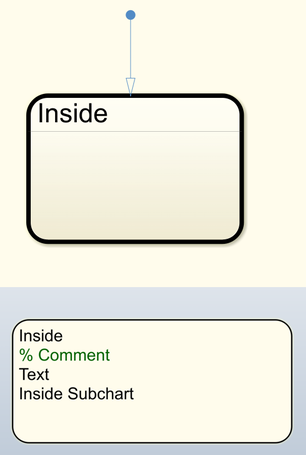
Simulink *.mdl model support restriciton
Simulink models with the extension .mdl are not supported in EHANDBOOK for MATLAB version R2021a and beyond. But .slx can be used instead.
Reduced container generation time with Simulink Toolbox and Simulink App
In order to speed-up container generation, the implementation for collecting Simulink paths required for the model is improved.
Generate documentation from PDF input sources
EHANDBOOK Container-Build 11.1 can now generate documentation from PDF as input sources. For details, refer to How to support PDF input source
Support for signed measurement values
With EHANDBOOK 11.1, all signed measurement values are shown as without converting them to unsigned values.
Support for Admonition blocks in AsciiDoc files
Admonition blocks such as NOTE, TIP, IMPORTANT, WARNING, CAUTION in AsciiDoc files are now converted by EHANDBOOK Container-Build and displayed in EHANDBOOK-NAVIGATOR.
Support for non name based signal communication
For details, refer to Support for cross domain projects
Version 11.0 (March 2023)
Support for area and annotation blocks
In Simulink, blocks of type area and annotation are often used to mark special areas. A typical characteristic is that they have a colored background, and that they are used as a background for other blocks.
So far, area blocks were not yet supported in EHANDBOOK. While annotation blocks were already supported, there where, however, issues with overlapping annotation blocks.
With EHANDBOOK 11.0, the Z-order for area and annotation blocks is not evaluated during the conversion to an interactive model. Through this, these blocks can now be properly rendered in EHANDBOOK-NAVIGATOR - even in case of overlaps.
|
Area and annotation blocks are only displayed in default layout. In automatic layout, they are not shown as they might appear in a wrong place. |
Support for Simulink block descriptions
In Simulink models, non-referenced masked blocks can have a block description that can even be customized by the modeler. The block description can contain valuable information to understand the meaning of a block.
In EHANDBOOK-NAVIGATOR, the block description is now available as a tooltip upon hovering over the block.
New CLI option -simlibfile
To convert and render Simulink models appropriately, EHANDBOOK Container-Build (or UGG) must know the paths to all Simulink libraries that are used by a Simulink model. (For details, refer to How to support Simulink libraries in EHANDBOOK).
So far, EHANDBOOK Container-Build provided the CLI option -simlib which required to pass all Simulink library paths as a String.
To simplify passing Simulink library paths to EHANDBOOK Container-Build, there is a new CLI option to pass them as a confioguration file in JSON format.
For details, refer to
CLI options for EHB-CB.
Highlight Error and Warning messages in console window
Errors and warning messages are now highlighted in color in the console window. Through this, important messages can be identified more easily.
Root-level skipping for UGG generated interactive models
Root-level skipping is a feature where the entry level of an ASCET or Simulink-based interactive model is adjusted in such a way that certain unnecessary root-levels are skipped. This feature was supported for the standard EHB-CB approach where ASCET and Simulink models are converted, but not for the incremental EHB-CB approach where pre-generated UGG artifacts are processed. With EHANDBOOK 11.0, root-level skipping is now also supported for pre-generated UGG artifacts.
Version 10.3 (December 2022)
New Docs & Tutorials
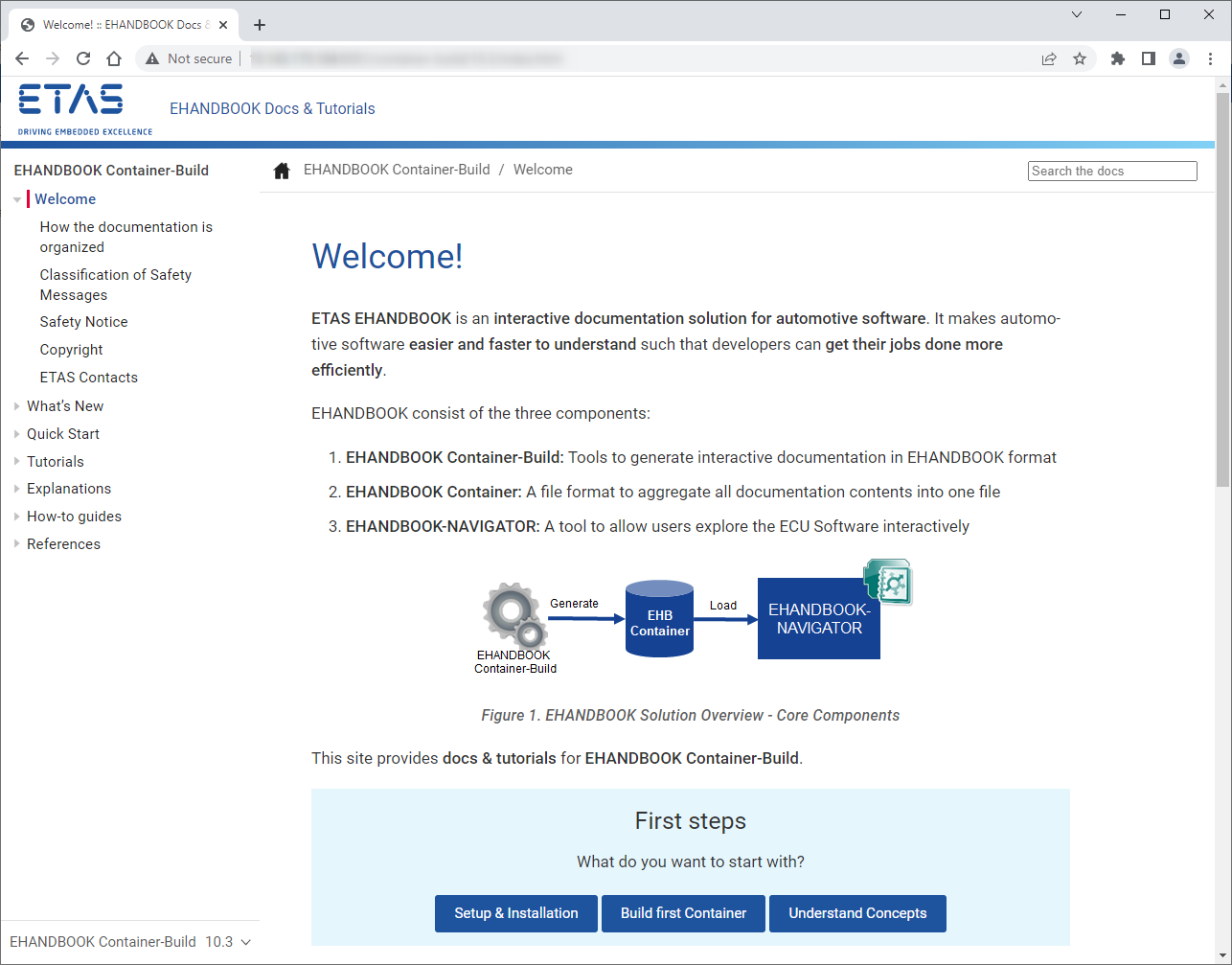
The EHANDBOOK Container-Build documentation is now available as one complete website. This replaces the previously used multiple PDF documents. With the new web-based documentation, all contents can be searched and navigated seamlessly. Furthermore, the content has been enhanced with a set of Tutorials.
For an overview, see the Welcome page.
Auto-offset for Simulink-based interactive models
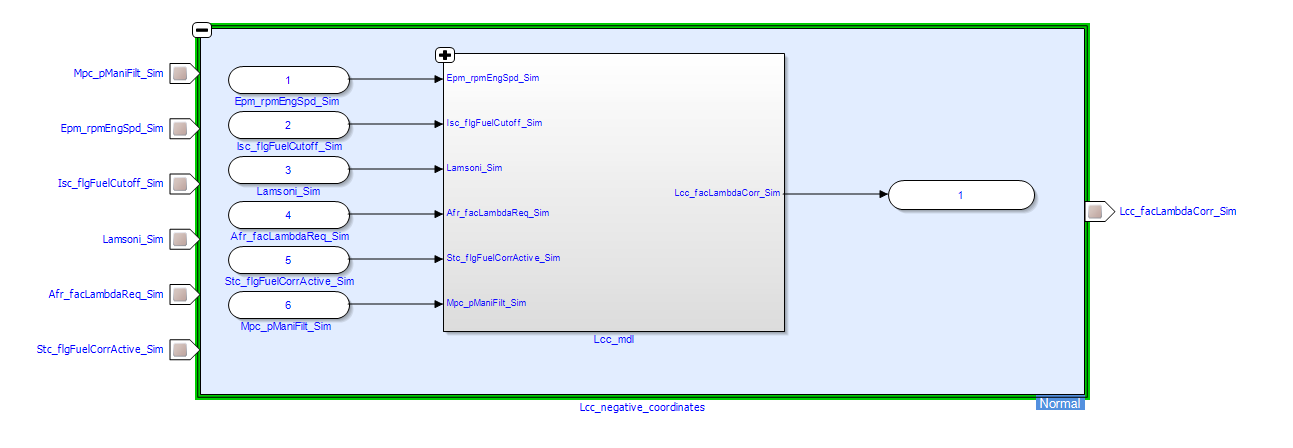
The blocks in Simulink models automatically are assigned with coordinates for their placement on the canvas. When the canvas is panned and new blocks are added, it can happen that the coordinates have negative values.
When converting Simulink models with negative coordinates to interactive models, in EHANDBOOK-NAVIGATOR this has lead to overlaps, e.g. when a function overview block is expanded.
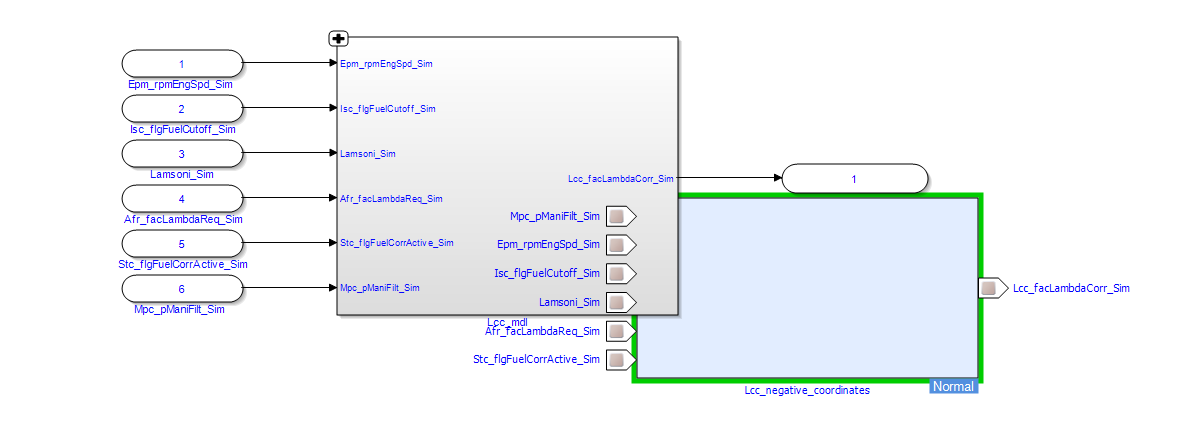
With EHANDBOOK 10.3, negative coordintates are handled by introducing an automatic offset to the coordinates of blocks. This applies to both EHANDBOOK Container-Build as well as EHANDBOOK-NAVIGATOR.
ClickPic supported when using UGG and EHB-CB in combination with intermediate hierarchy filtering
In EHANDBOOK 10.2.0 and earlier, the ClickPic feature was not working as expected when using the Unified Graphics Generator (UGG) for pre-generating interactive models and EHANDBOOK Container-Build in combination with intermediate hierarchy filtering concept. Thic scenario is now also supported.
Support for ASCET 6.4.7
EHANDBOOK Container-Build 10.3.0 now supports the conversion of models created with ASCET 6.4.7 to interactive models. This also applies for the EHANDBOOK Container-Build add-on 10.3.0 for ASCET 6.
EHANDBOOK Container-Build App for Simulink considers data dictionary for mask image generation
The mask definitions of blocks used in a Simulink model can make use of signals and calibrations defined in an associated data dictionary. When generating EHANDBOOK Containers from Simulink models using the EHANDBOOK Container-Build App for Simulink, the associated data dictionary is now also considered.
Simulink block support
Support for Process-Trigger, Initialization, Action-Subsystem in Simulink based interactive models.
Fixes for security vulnerabilities
CVE-2022-42889
CVE-2022-42889: Apache Commons Text prior to 1.10.0 allows RCE when applied to untrusted input due to insecure interpolation defaults
Impact Analysis: The affected class StringSubstitutor is not used within EHANDBOOK. In general, only a web/cloud based tool which uses direct user input would be affected. See usage example: https://securitylab.github.com/advisories/GHSL-2022-018_Apache_Commons_Text/
Fix: The Apache Commons Text plugin used in EHANDBOOK was updated to 1.10.0.
The fix was also shipped as hotfix EHANDBOOK 10.2.3 to customers on request.
Version 10.2 (September 2022)
-
New feature: Label configuration for AUTOSAR (Classic) interface elements
-
New feature: Create links to interactive models and function overviews of other documentation chapters
-
New feature: Support for Simulink DocBlocks in the documentation for Simulink
-
Improvement: ASCET models with empty project specifications are handled
Version 10.1 (June 2022)
-
New feature: Generate EHANDBOOK Containers from AUTOSAR (Classic) .arxml files only
-
Improvement: Support for ASCET models create with V6.4.6
-
Improvement: Specify signals with multiple interface elements via Excel file in Directory-based EHANDBOOK Container-Build
-
Improvement: Configurable number of threads for PDF generation
-
Improvement: Support for MATLAB 2021b
-
Improvement: Support for Comment-out and Comment-through blocks in Simulink-based interactive models
-
Improvement: Support for TeX markup commands in mask definitions of Simulink blocks
Version 10.0 (March 2022)
-
Improvement: Default behavior for mask generation has changed to Simulink Mask Decorations as Image. The earlier option -DenableSimulinkMaskDecorationsAsImage is deprecated.
-
New feature: Linux products available for EHB-CB and UGG
-
Improvement: The AUTOSAR (Classic) addon supports the Simulink AUTOSAR blockset