How to Create AsciiDoc References from Model Explorer
Procedure
To create model reference for documentation from Model Explorer:
-
Go to Model Explorer.
-
Select the required model and right-click.
A context menu is displayed. -
Click
Copy as model reference for AsciiDoc.
<Or> -
Press <CTRL+C>.
A notification pop-ups.
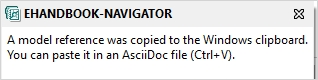
The model reference path is copied and it can be pasted in the AsciiDoc file.
To create function overview reference for documentation from Model Explorer:
-
Go to Model Explorer.
-
Select the required model and right-click.
A context menu is displayed. -
Click
Copy as function overview reference for AsciiDoc.
A notification pop-ups.
The model reference path is copied and it can be pasted in the AsciiDoc file.
|
The function overview feature is available at the function overview diagram level or at the function component root node level. |
|
Both features are available in all model languages (ASCET/Simulink/C-code models). |