C-Code Library Configuration
Organizing Shared Implementations with a Library Folder
If multiple ECU functions use the same C or header files, you can store these shared files in a separate library folder.
The library folder can be placed outside the main input directory and referenced through the libraryPath setting in the C-Code configuration file.
Example directory structure:
└── ECU_SW_XYZ
    ├── Function1
    │   └── function_1_implementation.c
    ├── Function2
    │   └── function_2_implementation.c
└── lib
    ├── shared_util.c
    └── shared_util.h
Example: Using a Shared Library
The following example shows how two ECU functions use the same shared library.
lib/shared_util.h)#ifndef SHARED_UTIL_H
#define SHARED_UTIL_H
int addValues(int a, int b);
#endiflib/shared_util.c)#include "shared_util.h"
int addValues(int a, int b) {
return a + b;
}Function1/function_1_implementation.c)#include "shared_util.h"
int computeMotorSpeed(void) {
int base = 100;
int offset = 20;
// Library function used here
return addValues(base, offset);
}Function2/function_2_implementation.c)#include "shared_util.h"
int computePower(void) {
int voltage = 12;
int current = 3;
// Same library function used here
return addValues(voltage, current);
}Library Configuration in EHANDBOOK
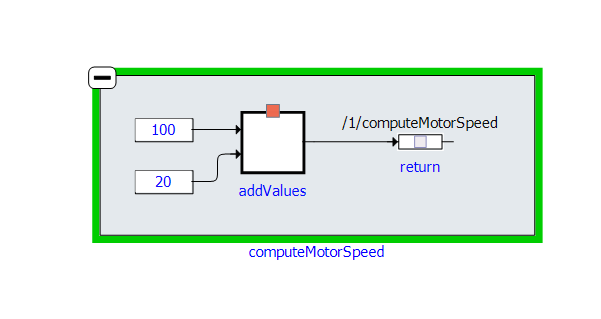
Without configuring the libraryPath, EHANDBOOK Container-Build cannot resolve shared functions. These functions are shown as black boxes in the interactive model.
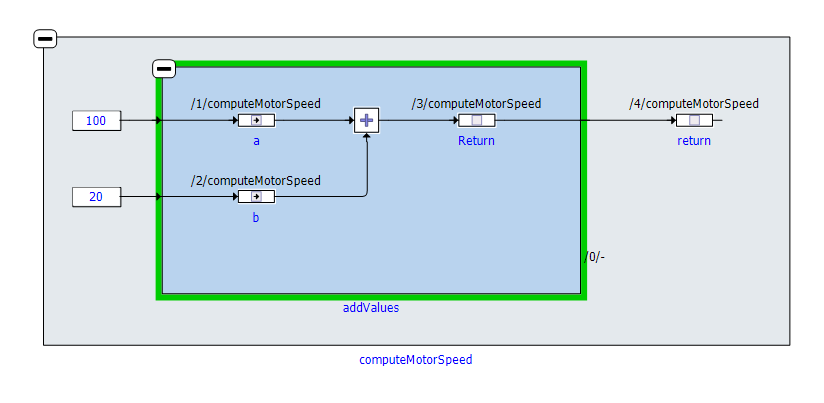
After configuring the libraryPath, EHANDBOOK Container-Build resolves the shared functions and displays the complete function call hierarchy.
|
Using a shared library provides the following benefits:
|