Incremental Build Workflow with UGG
Unified Graphics Generator (UGG)
The Unified Graphics Generator (UGG) is a high-performance tool that generates interactive models, SVG images, and map files from Simulink, ASCET, or C-Code models.
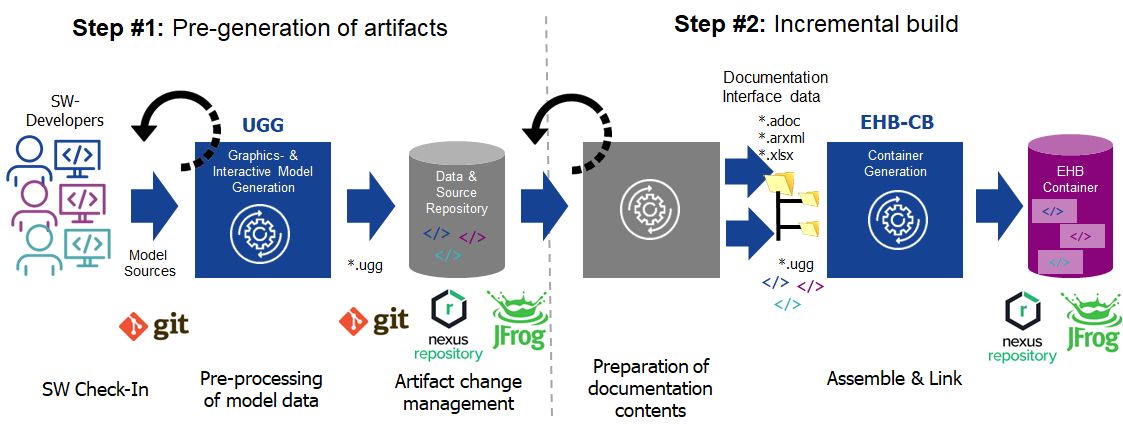
UGG separates model conversion from the final EHANDBOOK Container generation. This enables an Incremental Build workflow.
The main benefits are:
-
Pre-generated Artifacts: UGG generates the required artifacts in advance. These artifacts can be reused for later container builds.
-
Incremental Updates: UGG processes only the models that have changed. Unchanged models do not need to be processed again.
-
Faster Builds: EHANDBOOK Container-Build (EHB-CB) reuses the existing artifacts to generate the final container. This reduces build time, especially for large ECU software projects.
|
UGG is useful for automated build environments where containers need to be generated quickly and frequently, especially for large projects with regular software updates. |
Conceptual Overview
In a standard build, EHANDBOOK Container-Build (EHB-CB) converts the models and generates the container in the same process.
For large ECU projects, converting many Simulink or ASCET models can take a long time.
With UGG, model conversion is separated from container generation. UGG generates the model artifacts in advance, and EHB-CB reuses them when creating the final container.
The workflow consists of the following steps:
-
Artifact Generation: UGG processes Simulink, ASCET, or C-Code models and generates artifacts such as interactive model data, SVG images, and map files.
-
Incremental Update: When a model changes, UGG processes only the changed model.
-
Fast Assembly: EHB-CB reuses the generated artifacts and combines them with other documentation sources, such as AsciiDoc or ASAM FSX, to create the final
.ehbcontainer.
Target Usage
The incremental workflow is recommended for:
-
Continuous Integration (CI): Automated build pipelines such as Jenkins or GitLab CI, where documentation needs to be updated regularly.
-
Large Model Landscapes: Projects with many models or different model formats, where converting everything during each build takes too long.
-
Fast Feedback Loops: Development environments where users need access to the latest documentation container quickly.
Target Users
This workflow is mainly intended for:
-
ECU Software Build Experts: Responsible for maintaining the automated build environment.
-
Process & Tooling Leads: Responsible for defining the methods and tools used for ECU software development.
|
Starting with EHANDBOOK 13.2, UGG and EHB-CB are included in a single software distribution. This simplifies the setup of incremental build environments. UGG functionality still requires the appropriate electronic license, for example:
|