ASAM Exchange Format: MDX Structure
The MDX File Structure
The MDX file contains information about variables, parameters, system constants and class instances. This meta data (like imported/exported/local, compu-method, data-type, …) of labels is stored in an internal database of the EHB container.
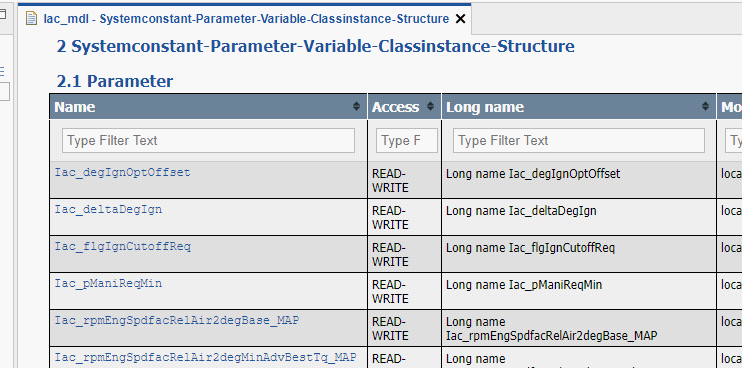
In addition, the standard chapters Systemconstant-Parameter-Variable-Classinstance-Structure for each FC are created out of this data.
|
The appearance of these standard chapters can be configured in a flexible way. For details please refer to the chapter Label table configuration in the EHB-CB User Guide. |
Furthermore, the MDX content is used for properties view, label pop-up, auto-tagging and search proposal dialog in EHB-NAV.
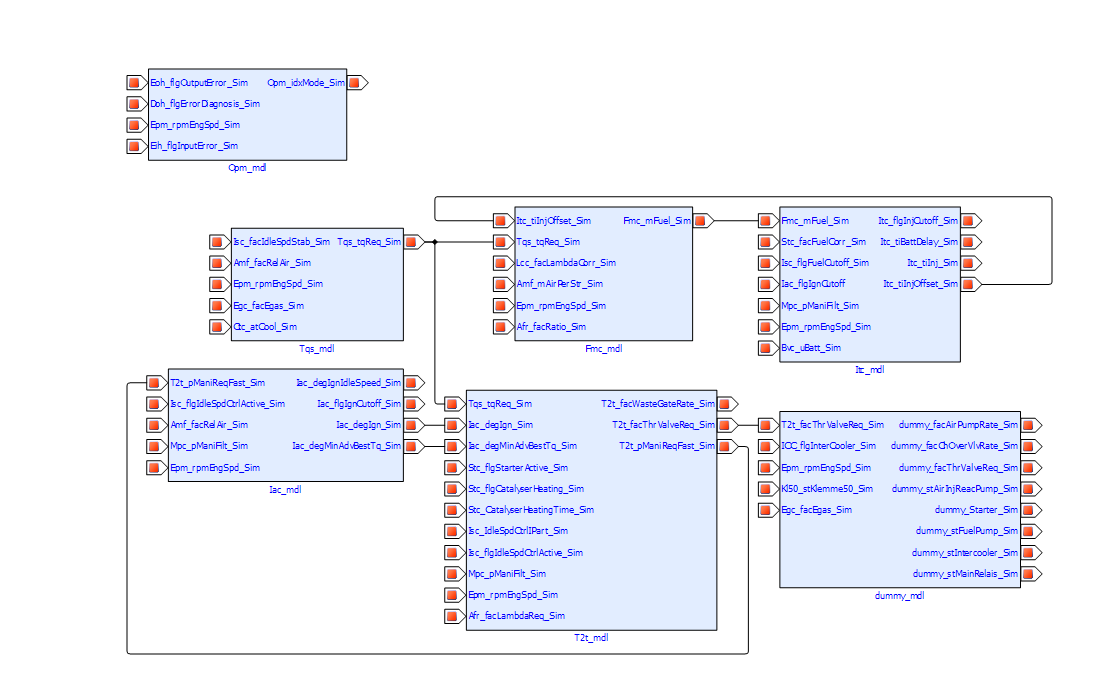
Another NAV feature supported using MDX information is the “Function Overview”. It provides mapping between the FC’s in the whole container and how all the element labels are related. This works name based.
Example in EHB-NAV:
The MDX format for EHB in detail:
All variables, parameters and system constants have to be defined in the global <SW-DATA-DICTONARY-SPEC>, their meta data will be specified in the section <SW-DATA-DEF-PROPS>.
<SW-DATA-DICTIONARY-SPEC>
	<SW-VARIABLES>
		<SW-VARIABLE>
			<SHORT-NAME>Amf_facRelAir_Sim</SHORT-NAME>
			<LONG-NAME>Long name Amf_facRelAir_Sim</LONG-NAME>
			<CATEGORY>VALUE</CATEGORY>
			<SW-DATA-DEF-PROPS>
				...
			</SW-DATA-DEF-PROPS>
		</SW-VARIABLE>
	</SW-VARIABLES>
	<SW-CALPRMS>
		<SW-CALPRM>
			<SHORT-NAME>Iac_degIgnOptOffset</SHORT-NAME>
			<LONG-NAME>Long name Iac_degIgnOptOffset</LONG-NAME>
			<CATEGORY>VALUE</CATEGORY>
			<SW-DATA-DEF-PROPS>
				...
			</SW-DATA-DEF-PROPS>
		</SW-CALPRM>
	</SW-CALPRMS>
</SW-DATA-DICTIONARY-SPEC>|
All labels defined in the dictionary have to be unique by their |
Per SW component, the labels defined in the dictionary, are then referred by their <SHORT-NAME> as local, exported or imported.
<SW-COMPONENT-SPEC>
	<SW-COMPONENTS>
		<SW-FEATURE>
			<SHORT-NAME>Iac_mdl</SHORT-NAME>
			<LONG-NAME>Feature Iac</LONG-NAME>
			<CATEGORY>FCT</CATEGORY>
			<SW-FEATURE-OWNED-ELEMENT-SETS>
				<SW-FEATURE-OWNED-ELEMENT-SET>
					<SW-FEATURE-ELEMENTS>
						...
					</SW-FEATURE-ELEMENTS>
				</SW-FEATURE-OWNED-ELEMENT-SET>
			</SW-FEATURE-OWNED-ELEMENT-SETS>
			<SW-FEATURE-INTERFACES>
				<SW-FEATURE-INTERFACE>
					<SHORT-NAME>Iac_Ex_mdl</SHORT-NAME>
					<CATEGORY>EXPORT</CATEGORY>
					<SW-INTERFACE-EXPORTS>
						<SW-INTERFACE-EXPORT>
							<SW-FEATURE-ELEMENTS>
								...
							</SW-FEATURE-ELEMENTS>
						</SW-INTERFACE-EXPORT>
					</SW-INTERFACE-EXPORTS>
				</SW-FEATURE-INTERFACE>
				<SW-FEATURE-INTERFACE>
					<SHORT-NAME>Iac_Im_mdl</SHORT-NAME>
					<CATEGORY>IMPORT</CATEGORY>
					<SW-INTERFACE-IMPORTS>
						<SW-INTERFACE-IMPORT>
							<SW-FEATURE-ELEMENTS>
								...
							</SW-FEATURE-ELEMENTS>
						</SW-INTERFACE-IMPORT>
					</SW-INTERFACE-IMPORTS>
				</SW-FEATURE-INTERFACE>
			</SW-FEATURE-INTERFACES>
		</SW-FEATURE>
		...
Structures in MDX
EHANDBOOK supports configuration of structure data types for Simulink. Structures are mapped to Simulink buses and visualized in EHB-NAV in the label popup. Structures can be defined in MDX following the MDX specification. EHANDBOOK supports the following subset of MDX:
-
STRUCTURE - SW-VARIABLE
-
STRUCTURE - SW-CALPRM
The structure name and member names must match to the Simulink bus names. Structures are defined in the global data dictionary in the same way as other variables or parameters, but in a hierarchical construct. Variable with CATEGORY “STRUCTURE” contains <SW-VARIABLES> tag under which other variables are defined. This head SW-VARIABLE becomes the ‘structure’ and the children SW-VARIABLEs become members to it.
<!-- MDX Snippet for structs -->
<SW-VARIABLE>
	<SHORT-NAME>subBus</SHORT-NAME>
	<LONG-NAME>subBus longName</LONG-NAME>
	<CATEGORY>STRUCTURE</CATEGORY>
	<SW-DATA-DEF-PROPS>
		<SW-ADDR-METHOD-REF>VAR_INIT</SW-ADDR-METHOD-REF>
		<SW-CALIBRATION-ACCESS>READ-ONLY</SW-CALIBRATION-ACCESS>
	</SW-DATA-DEF-PROPS>
	<SW-VARIABLES>
		<SW-VARIABLE>
			<SHORT-NAME>chirp</SHORT-NAME>
			<LONG-NAME>chirp Signal</LONG-NAME>
			<CATEGORY>VALUE</CATEGORY>
			<SW-DATA-DEF-PROPS>
				<SW-ADDR-METHOD-REF>VAR_INIT</SW-ADDR-METHOD-REF>
				<SW-CALIBRATION-ACCESS>READ-ONLY</SW-CALIBRATION-ACCESS>
			</SW-DATA-DEF-PROPS>
		</SW-VARIABLE>
		<SW-VARIABLE>
			<SHORT-NAME>sine</SHORT-NAME>
			<LONG-NAME>sine wave</LONG-NAME>
			<CATEGORY>VALUE</CATEGORY>
			<SW-DATA-DEF-PROPS>
				<SW-ADDR-METHOD-REF>VAR_CLEARED</SW-ADDR-METHOD-REF>
				<SW-CALIBRATION-ACCESS>READ-ONLY</SW-CALIBRATION-ACCESS>
			</SW-DATA-DEF-PROPS>
		</SW-VARIABLE>
	</SW-VARIABLES>
</SW-VARIABLE>
Naming convention and rules:
In the above example SW-VARIABLE subBus becomes the ‘structure’ and SW-VARIABLE chirp and sine become its members. Internally in EHANDBOOK we store the members along with its structure name, for example “subBus.chirp” and “subBus.sine”.
The delimiter ‘.’ dot is used for combining the structure and member names.
SW-VARIABLE structure cannot contain another SW-VARIABLE structure inside it. Nesting of structures are not allowed as per the MDX specifications (see mdx_v1.3.0.xsd).
The member names of a structure can repeat with different structures. It only needs to be unique within its structure. For example, structure1.sine and structure2.sine can exist.
The referring between the structure and the FC component works also in the same way as other variables via their <SHORT-NAME>:
<SW-COMPONENT-SPEC>
	<SW-COMPONENTS>
		<SW-FEATURE>
			<SHORT-NAME>Iac_mdl</SHORT-NAME>
			<LONG-NAME>Feature Iac</LONG-NAME>
			<CATEGORY>FCT</CATEGORY>
			<SW-FEATURE-OWNED-ELEMENT-SETS>
				<SW-FEATURE-OWNED-ELEMENT-SET>
					<SW-FEATURE-ELEMENTS>
						<SW-VARIABLE-REF>subBus</SW-VARIABLE-REF>
					</SW-FEATURE-ELEMENTS>
				</SW-FEATURE-OWNED-ELEMENT-SET>
			</SW-FEATURE-OWNED-ELEMENT-SETS>
SW-VARAIBLE of category STRUCTURE are referenced to a SW-FEATURE using the <SW-FEATURE-INTERFACES> with “IMPORT”, “EXPORT” categories or <SW-FEATURE-OWNED-ELEMENT-SETS> (=local). From the above example subBus will be treated as local for the SW-FEATURE under which it is defined.
EHANDBOOK does not derive the relation between the SW-FEATURE and the structure members. Users have to explicitly add an entry of a structure.member in the REFERENCES for establishing the import/export category. For example subBus.sine won’t appear as local in the EHANBDOOK context unless the user enters subBus.sine as a SW-VARIABLE-REF.
One MDX File per FC
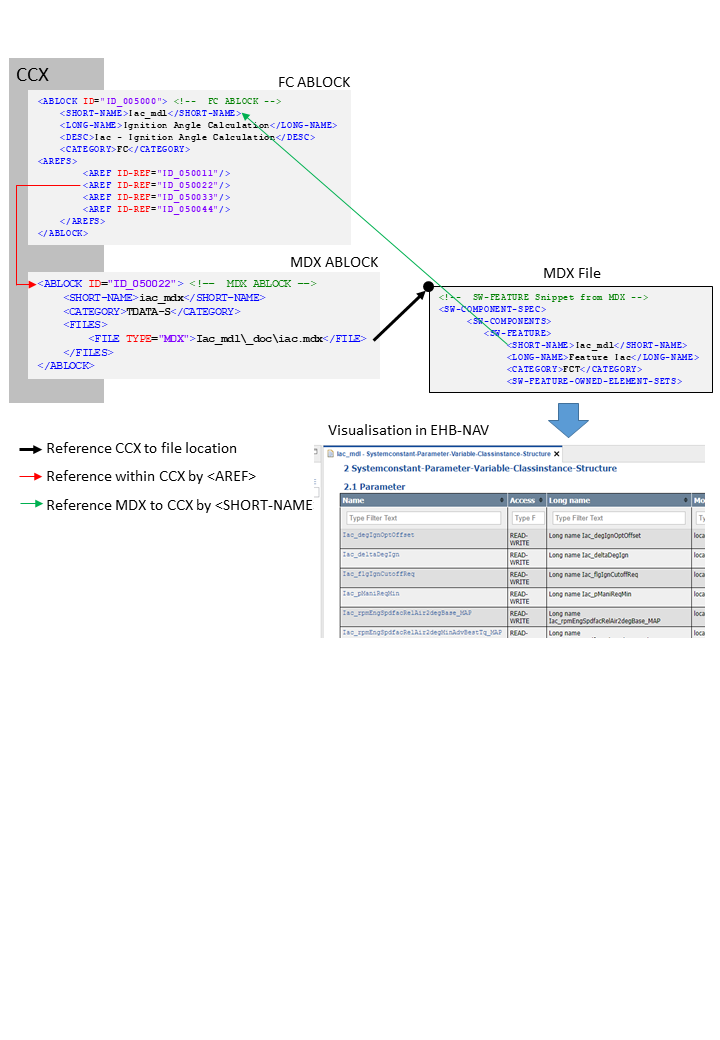
In CCX, the FC ABLOCK is referring to its MDX file ABLOCK using AREF-ID. The reference from the FC ABLOCK in CCX to its related content in the MDX file is done by <SHORT-NAME>. The SW-FEATURE <SHORT-NAME> in MDX must be same as the FC <SHORT-NAME> in the CCX file.
The result in EHB-NAV is the standard chapter “Systemconstant-Parameter-Variable-Classinstance-Structure “ with the corresponding table to appear, as shown below:
Referencing method between CCX and individual MDX per FC
<!-- FC ABLOCK -->
<ABLOCK ID="ID_005000">
	<SHORT-NAME>Iac_mdl</SHORT-NAME>
	<LONG-NAME>Ignition Angle Calculation</LONG-NAME>
	<DESC>Iac - Ignition Angle Calculation</DESC>
	<CATEGORY>FC</CATEGORY>
	<AREFS>
		<AREF ID-REF="ID_050011"/>
		<AREF ID-REF="ID_050022"/> (1)
		<AREF ID-REF="ID_050033"/>
		<AREF ID-REF="ID_050044"/>
	</AREFS>
</ABLOCK>| 1 | Reference to MDX ABLOCK |
<!-- MDX ABLOCK -->
<ABLOCK ID="ID_050022">
	<SHORT-NAME>iac_mdx</SHORT-NAME>
	<CATEGORY>TDATA-S</CATEGORY>
	<FILES>
		<FILE TYPE="MDX">Iac_mdl\_doc\iac.mdx</FILE> (1)
	</FILES>
</ABLOCK>| 1 | Reference to MDX File |
<!--  SW-FEATURE Snippet from MDX -->
<SW-COMPONENT-SPEC> (1)
	<SW-COMPONENTS>
		<SW-FEATURE>
			<SHORT-NAME>Iac_mdl</SHORT-NAME> (2)
			<LONG-NAME>Feature Iac</LONG-NAME>
			<CATEGORY>FCT</CATEGORY>
			<SW-FEATURE-OWNED-ELEMENT-SETS>
...| 1 | See Visualisation in EHB-NAV |
| 2 | Short name matches with FC ABLOCK |
One global MDX File
Besides individual MDX files for each FC, there is also the possibility to use one common MDX file for all function components in the whole container.
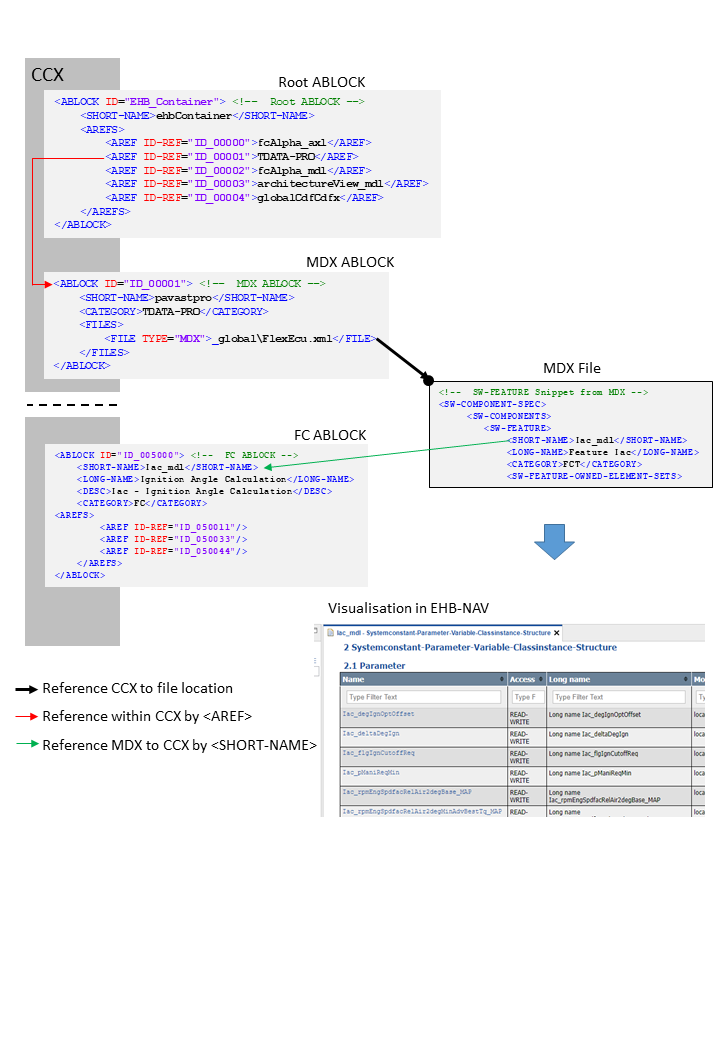
This global MDX file is defined in a separate ABLOCK in CCX in the same way as for the individual ones per FC, but linked in a different way:
It has to be referenced with its ID as an additional TOC entry in the CCX in AREFS. The CATEGORY has to be TDATA-PRO, and will look as follows:
Referencing method between CCX and global MDX
<!-- Root ABLOCK -->
<ABLOCK ID="EHB_Container">
	<SHORT-NAME>ehbContainer</SHORT-NAME>
	<AREFS>
		<AREF ID-REF="ID_00000">fcAlpha_axl</AREF>
		<AREF ID-REF="ID_00001">TDATA-PRO</AREF> (1)
		<AREF ID-REF="ID_00002">fcAlpha_mdl</AREF>
		<AREF ID-REF="ID_00003">architectureView_mdl</AREF>
		<AREF ID-REF="ID_00004">globalCdfCdfx</AREF>
	</AREFS>
</ABLOCK>| 1 | Reference to MDX ABLOCK |
<!-- MDX ABLOCK -->
<ABLOCK ID="ID_00001">
	<SHORT-NAME>pavastpro</SHORT-NAME>
	<CATEGORY>TDATA-PRO</CATEGORY>
	<FILES>
		<FILE TYPE="MDX">_global\FlexEcu.xml</FILE> (1)
	</FILES>
</ABLOCK>| 1 | Reference to MDX File |
<!-- SW-FEATURE Snippet from MDX -->
<SW-COMPONENT-SPEC> (1)
	<SW-COMPONENTS>
		<SW-FEATURE>
			<SHORT-NAME>Iac_mdl</SHORT-NAME> (2)
			<LONG-NAME>Feature Iac</LONG-NAME>
			<CATEGORY>FCT</CATEGORY>
<SW-FEATURE-OWNED-ELEMENT-SETS>| 1 | See Visualisation in EHB-NAV |
| 2 | Short name matches with FC ABLOCK |
<!-- FC ABLOCK -->
<ABLOCK ID="ID_005000">
	<SHORT-NAME>Iac_mdl</SHORT-NAME>
	<LONG-NAME>Ignition Angle Calculation</LONG-NAME>
	<DESC>Iac-Ignition Angle Calculation</DESC>
	<CATEGORY>FC</CATEGORY>
	<AREFS>
		<AREF ID-REF="ID_050011"/>
		<AREF ID-REF="ID_050033"/>
		<AREF ID-REF="ID_050044"/>
	</AREFS>
</ABLOCK>