ASAM Exchange Format: Overview
EHANDBOOK and ASAM EX in general
The new ETAS EHANDBOOK solution is an interactive documentation tool set, making ECU software understandable. This solution consists in 3 parts: the EHANDBOOK Container-Build tool chain for the container generation, later called EHB-CB, the container itself, which is containing the documentation data in a special format and the EHANDBOOK-NAVIGATOR, the tool to work with the containers, later called EHB-NAV.
One possibility as input for EHB-CB are files in ASAM exchange format. This document describes the required structure of the ASAM files for EHB related use cases only.
For the general format and structure information of ASAM Exchange, please refer to www.asam.net. Here you can get the full specifications for -
-
ASAM CC (Container Catalog) is used for describing engineering objects:
Definition of an XML-based format for describing engineering objects such as source code, compiled objects or documentation files, and associated meta information about the objects, such as creator, name or version. Primarily used for exchanging information between OEM and supplier. -
ASAM FSX (Functional Specification Exchange Format) describes the functional behavior of software:
Definition of an XML-based format for describing the functional specification of software, primarily for the purpose of generating technical documentation. The format allows documentation via prose text in multiple languages, cross-referencing, linking and mentioning of requirements. Variations of the specification can be expressed. Is complementary to MDX, which contains the interface definitions of functions. FSX is a subset of MSRSW components -
ASAM MDX (Model Data Exchange Format) describes the software architecture and data definition of the software: Definition of an XML-based format for describing interfaces of functions, their data (variables and calibration parameters) and scheduling in ECU software. This allows the integration of such functions as object code into the overall ECU software without having access to the source code. Standard is complementary to FSX, which contains the functional description of functions. MDX is the predecessor of the AUTOSAR Software Component Template
If you have your input files in a different format, we are happy to support you with our ETAS engineering services and adapt the EHB-CB to your needs.
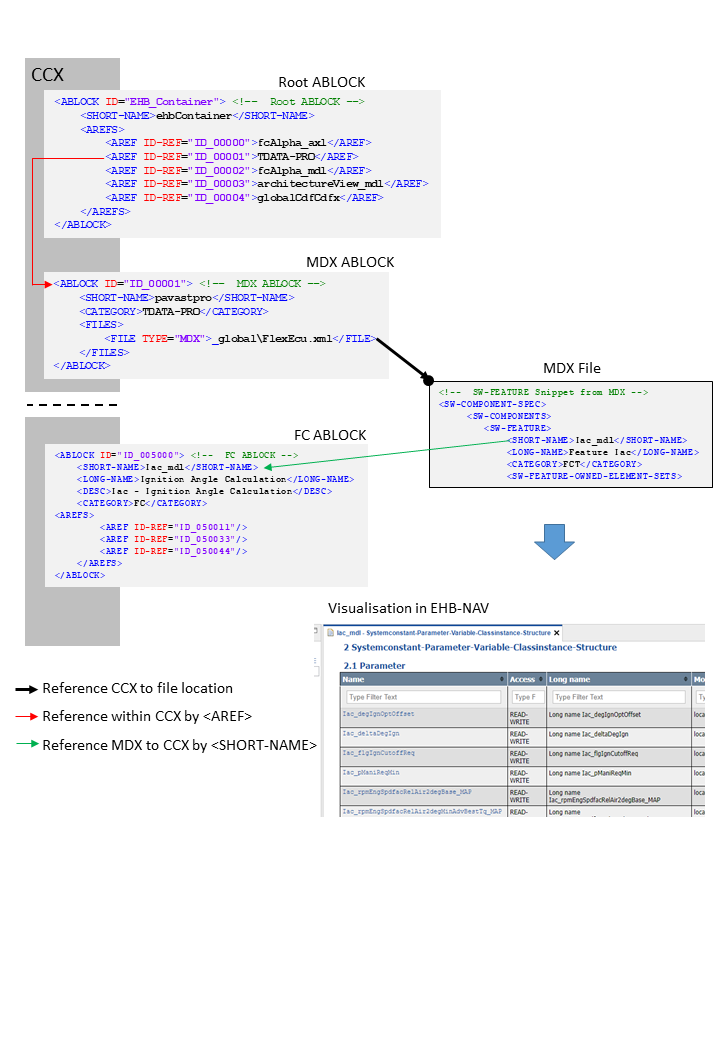
Here a brief overview about the ASAM concept in principle in the context of EHB:
Important Notices
NOTICE
Incomplete container content due to wrong or corrupt file formats
Content of the generated EHANDBOOK Container may be incomplete, if the input data used for generating the container are not compliant to the following file formats:
-
ASAM formats
-
CCX
-
FSX
-
MDX
-
-
Image formats
-
JPG
-
PNG
-
EPS
-
-
Formulas
-
TeX
-
-
Text formats
-
AsciiDoc (supported subset)
-
These container contents can not be displayed in the EHANDBOOK-NAVIGATOR. Therefore, always check the log file of the EHANDBOOK Container-Build, after generating a new container. Missing, incorrect or false content will be tracked in the log file.
After generating a new container:
-
Check the entries in the log file of the EHANDBOOK Container
Build indicating missing or incorrect container content.
-
Ensure that the data used during the import match the above specified formats.
-
Generate a new container.
-
Only provide containers for further usage in the EHANDBOOK- NAVIGATOR, if the log file contains no entries indicating any missing or incorrect content.
If it is not possible to completely clean up the log file, inform the intended user of the container about this missing, incorrect or false container content.
NOTICE
Incomplete container content due to defective or inconsistent input data
Content of the generated EHANDBOOK Container may be missing, if the input data used for generating the container is defective or inconsistent. Affected container contents cannot be displayed or will be displayed incorrectly in the EHANDBOOK-NAVIGATOR. Therefore, always check the log file of the EHANDBOOK Container-Build. Defective or inconsistent input data that have led to errors when converting will be tracked in the log file.
The content consistency is in the responsibility of the data supplier (documentation publisher). We recommend that the data supplier develop a standard procedure for pre-processing the input data outside the EHANDBOOK Container-Build tool chain to ensure the data consistency and to reduce the workload for reviewing the input data. In addition, the pre-processing should be properly documented to ensure transparency.
After generating a new container:
-
Check the entries in the log file of the EHANDBOOK Container-Build indicating defective or inconsistent input data.
-
If necessary, fix the incorrect or inconsistent input data.
-
Re-build the EHANDBOOK Container.
-
Only provide containers for further usage in the EHANDBOOK-NAVIGATOR, if the log file contains no entries, indicating any defective or inconsistent input data.