ASAM Exchange Format: Model References
ASCET Model Reference to global Library and other Sub-Components
The standard behavior is that the ASCET axl file contains the ASCET project and all needed modules and classes. An extension in the future will support also external references to sub components and global libs in other directories.
If ASCET models for any FC are referencing a global library with general classes or services, this also has to be defined in the CCX as follows:
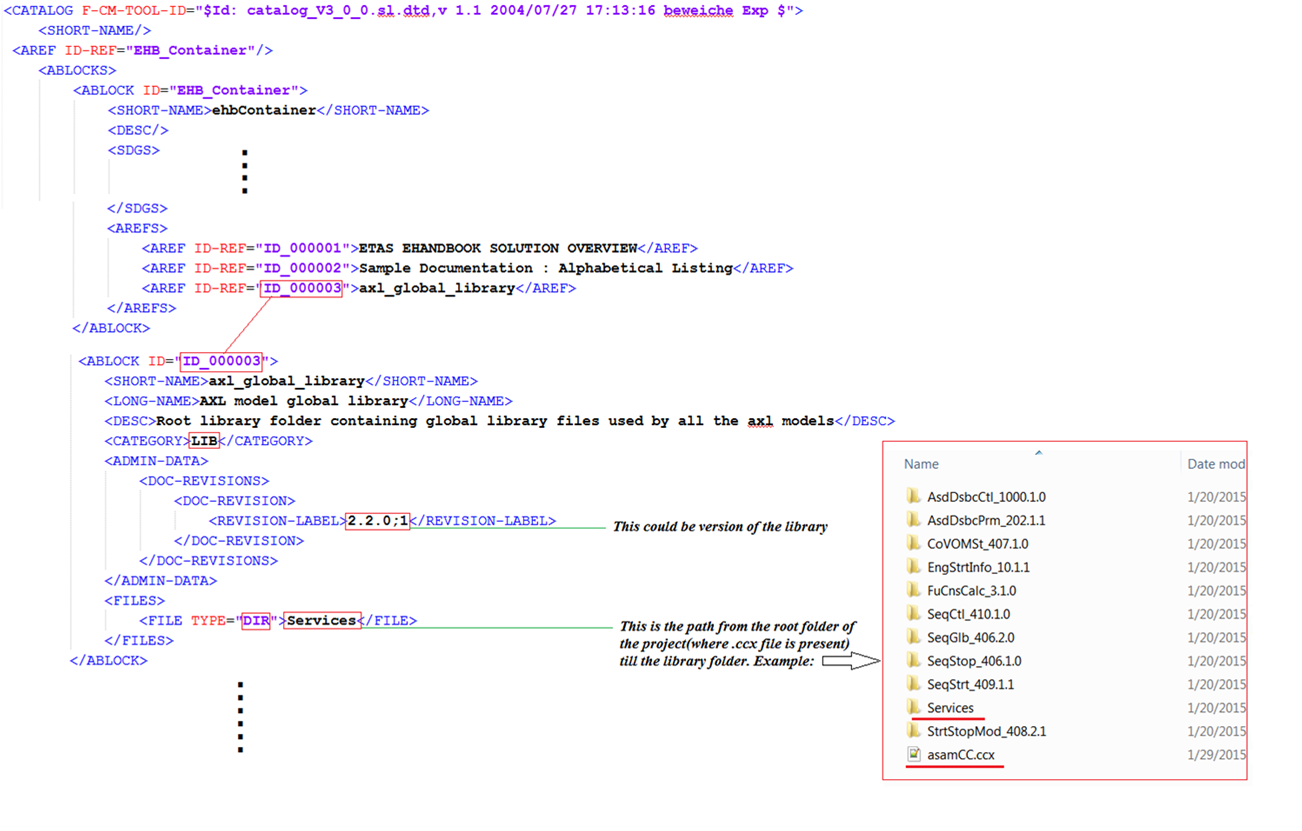
The prerequisites for this concept are:
-
There exists exactly one main directory for the global libs (called services here) which may contain multiple subdirectories, defined in CCX as described above.
-
There is no inter FC referencing used, but a sub-class could refer to another sub-class in the same FC. So references are only possible below the main directory of the FC or in the directory (or subdirectories) of the global libs
-
There is exactly one root axl per FC, which contains the ASCET project and is referred in the CCX (name e.g. <FC_name>_p.axl)
-
File names for classes in subdirectories of the FCs could be named the same, but all names in the global lib directory and below must be unique.
Simulink Model Reference to external Library
Typically, a Simulink model is also referencing external models or libraries. EHB-CB is capable to handle this in multiple ways:
-
Reference alongside
The library or model is found if it is in the same directory level as the main model itself -
Reference by system variable
Libraries were searched in system environment variable TB_HOMEDIR, sub path \dgs_lib_mlsl and below. -
Reference defined in CCX
One search path can be defined as <SD GID> tag in the Root ABLOCK in CCX:
<ABLOCK ID="EHB_Container">
	<!-- Root ABLOCK -->
	<SHORT-NAME>ehbContainer</SHORT-NAME>
	<DESC />
	<SDGS>
		<SDG GID="global">
			<SD GID="view">Detailed</SD>
			<SD GID="project_class">PVER</SD>
			<SD GID="project_longname">ETAS FlexECU-G1 Turbo</SD>
			<SD GID="project_shortname">EHB_Demo_Container</SD>
			<SD GID="project_date">2019-07-31 10:39:00</SD>
			<SD GID="Project_variant">V7.1.1</SD>
			<SD GID="Project_revision">3</SD>
			<SD GID="info_pver">EHANDBOOK Demo</SD>
			<SD GID="doc_class">SWCALDOC</SD>
			<SD GID="language">DE</SD>
			<SD GID="hide_component">true</SD>
			<SD GID="condition">true</SD>
			<SD GID="confidential_level_2">false</SD>
			<SD GID="doctype_text">Software Documentation</SD>
			<SD GID="MATLAB_LIB_PATH">C:\source\Simulink\M160</SD>
		</SDG>
	</SDGS>
	...
There is exactly one absolute file path allowed.
-
Reference defined by parameter
A search path can be defined by the command line parameter -simlib “path”. Here even multiple paths are allowed, separated by commas -simlib “path1,path2,etc”
The order above also defines the search order for a library, but without a fallback mechanism. If a path is defined, but there is no library found, the following options will be ignored anyway. This means, only one option can be used out of number 2. – 4. from above.
For the paths defined above, also any sub path below is searched. The search path defined is valid for all models of all FCs.
There is currently no library version check implemented. The user has to provide the correct version of the libs, which fits to the models. If multiple versions of a lib are provided, CB just takes the first one found.