EHANDBOOK Docs & Tutorials
✨ Ask AI Send Feedback GH GH GitHub

EHANDBOOK

    • Welcome
      • EHANDBOOK Solution Overview
      • Safety and Privacy Information
        • Intended Use
        • Target Group
        • Classification of Safety Messages
        • Safety Information
        • Warning Messages
        • Privacy
      • Copyright
      • ETAS Contacts
    • Navigator
      • How the documentation is organized
      • About
      • ✨ Wingman
      • Quick Start
        • Installing Navigator
        • Licensing the Software
        • Getting Started
        • Troubleshooting
      • Introduction Videos
      • What’s New
      • User Interface
        • Menus
        • Toolbars
        • Document Views
        • Model Views
        • Bookmark Views
        • Search Views
        • Label Popup
        • Other Views
        • Preference Dialogs
        • Wingman Chat
      • How-to guides
        • Project and file management
          • Create an EHANDBOOK project
          • Load an EHANDBOOK file or project
          • Load an EHANDBOOK file or project through File Explorer
          • Load multiple EHANDBOOK files through File Explorer
          • Save changes
          • Save as
        • Conversion and export
          • Load an A2L file
          • Export to PDF
          • Export log files
          • Extract content of an EHANDBOOK container
          • Annotate values from A2L/HEX/DCM/CDF files
        • Multi-container projects
          • Manage multiple EHANDBOOK files
          • Replace an EHANDBOOK file in a project
          • Remove an EHANDBOOK file from a project
          • Define alias and color in Manage Project
          • Identify content source across multiple EHANDBOOK files
        • Bookmarks and model views
          • Create a bookmark
          • Save a model view
          • Edit a bookmark
          • Edit a model view
          • Delete a bookmark or model view
          • Create a folder
          • Edit a folder
          • Delete a folder
          • Import bookmarks and model views
          • Export bookmarks and model views
          • Interpret bookmark and model view validity
        • Comments and model explorer
          • Add comments
          • Delete comments
          • Copy comments to clipboard
          • Save comments in a container
          • Export comments
          • Import comments
          • Comment on interactive models
          • Create AsciiDoc references from Model Explorer
        • Navigation, search, and shortcuts
          • Use navigation history
          • Filter and sort keyboard shortcuts
          • Change search highlight colors
          • Configure bookmark and comment icons
          • Filter and refine search results
        • Attachments
          • Add an attachment
          • Delete an attachment
        • Composite and legacy guides
          • Manage comments end-to-end
          • Work with EHANDBOOK-NAVIGATOR (legacy)
      • Tutorials
        • Interactive Models
        • Software Function Navigation
          • Seamless Function Wallpaper
          • ECU Software Function Navigation
        • Searching
        • Dependency Analysis
        • Interoperability with INCA
        • Interoperability with MDA 8
        • Live measurement with CANape
        • Cursor synchronization with CANape
        • Interoperability with ATI Vision
        • Visualization of Offline Measurement
        • Devices and Rasters
        • Compare Containers
      • FAQ
      • Known Issues
    • Container-Build
      • How the documentation is organized
      • Quick Start
        • Download, Installation & License Setup
        • Quick Start Demos
        • Graphical User Interface (GUI)
        • Command-Line Interface (CLI)
      • What’s New
      • Tutorials
        • ASCET-DEVELOPER
        • ASCET 6
        • Simulink
        • C-Code
        • AUTOSAR (Classic)
      • Explanations
        • Fundamental Concepts of ECU Software
        • EHANDBOOK Container-Build Principles
        • EHANDBOOK Container-Build in General
        • Tools for generating EHANDBOOK Containers
        • Incremental Build Workflow with UGG
        • Model Languages
          • ASCET-DEVELOPER
          • ASCET 6
          • Simulink / Stateflow / TargetLink
          • C-Code
        • Automotive Standards
          • AUTOSAR (Classic)
          • ASAM Exchange Formats
        • Setup & Installation
          • System Requirements
          • Download
          • Installation
            • Windows
            • Linux
            • Common for Windows and Linux
          • Electronic Licenses
            • License Features Overview
            • Evaluation Licenses
            • License Management Installation
              • Windows
              • Linux
          • Additional Third Party Tools
        • Supported Platforms
          • Windows
          • Linux
        • Supported Input File Formats and Versions
        • Features
          • Attachments
      • How-to guides
        • Prepare input for directory-based EHB-CB
        • Set up incremental builds for continuous integration
        • Configure EHB-CB for Simulink models
        • Support TargetLink models
        • Customize interactive models
          • Simulink
            • Pass Simulink library paths to EHB-CB
            • Handle .mat file initialization in Simulink models
            • Include Simulink DocBlocks in documentation
            • Support Simulink Variant block configuration
            • Include Simulink truth table blocks in documentation
          • ASCET-DEVELOPER
            • Exclude packages for ASCET-DEVELOPER
            • Include documentation for nested classes in ASCET-DEVELOPER
          • C-Code
            • Configure C-Code visualization
          • Visual appearance and detail level
            • Configure root-level skipping
            • Configure model depth
            • Configure intermediate hierarchy filtering
            • Understand the view concept
            • Configure appearance of Simulink library blocks
            • Understand the Simulink view concept
            • Configure details shown for Simulink subsystem-based blocks
            • Hide C-Code functions by function name
          • Label-specific configuration
            • Configure label names
            • Amend label names
            • Configure labels for AUTOSAR (Classic) interface elements
        • Textual content customization
          • Create ClickPic graphics
          • Create function overview diagrams
          • Configure label tables
        • EHB container customization
          • Configure password protection and encryption
          • Configure structure data type support
        • Provide attachments
          • Directory-based EHB-CB attachments
          • ASAM-based EHB-CB attachments
        • Specify tables of contents explicitly (directory-based EHB-CB)
        • Support Asian languages in EHANDBOOK-generated PDF documents
      • References
        • EHB-CB Usage in General
          • EHB-CB CLI Parameters
          • UGG CLI Parameters
          • INI Configuration (General)
          • INI Configuration (Simulink and MATLAB)
        • ASAM Exchange Format Overview
          • ASAM CCX Structure and ABLOCK Usage
          • ASAM MDX File Structure
          • ASAM FSX and Graphics
          • ASCET and Simulink Model References
          • Links and Attachments
        • Directory-based EHB-CB
          • AsciiDoc Specification
          • Word RTF Specification
          • Excel Format Specification
        • Styling
          • EHB Container Styling
          • PDF Styling
          • Title Page Styling
        • Definitions & Abbreviations
        • Limitations
      • Demos
      • FAQ
      • Known Issues
EHANDBOOK 14.2
  • EHANDBOOK
    • 14.2
    • 14.1
    • 14.0
    • 13.5
    • 13.4
    • 13.3
    • 13.2
    • 13.1
    • 13.0
    • 12.4
    • 12.3
    • 12.2
    • 12.1
    • 12.0
    • 11.3
    • 11.2
    • 11.1
    • 11.0
    • 10.3
    • 10.2
  • EHANDBOOK
  • Navigator
  • User Interface

User Interface

User Interface

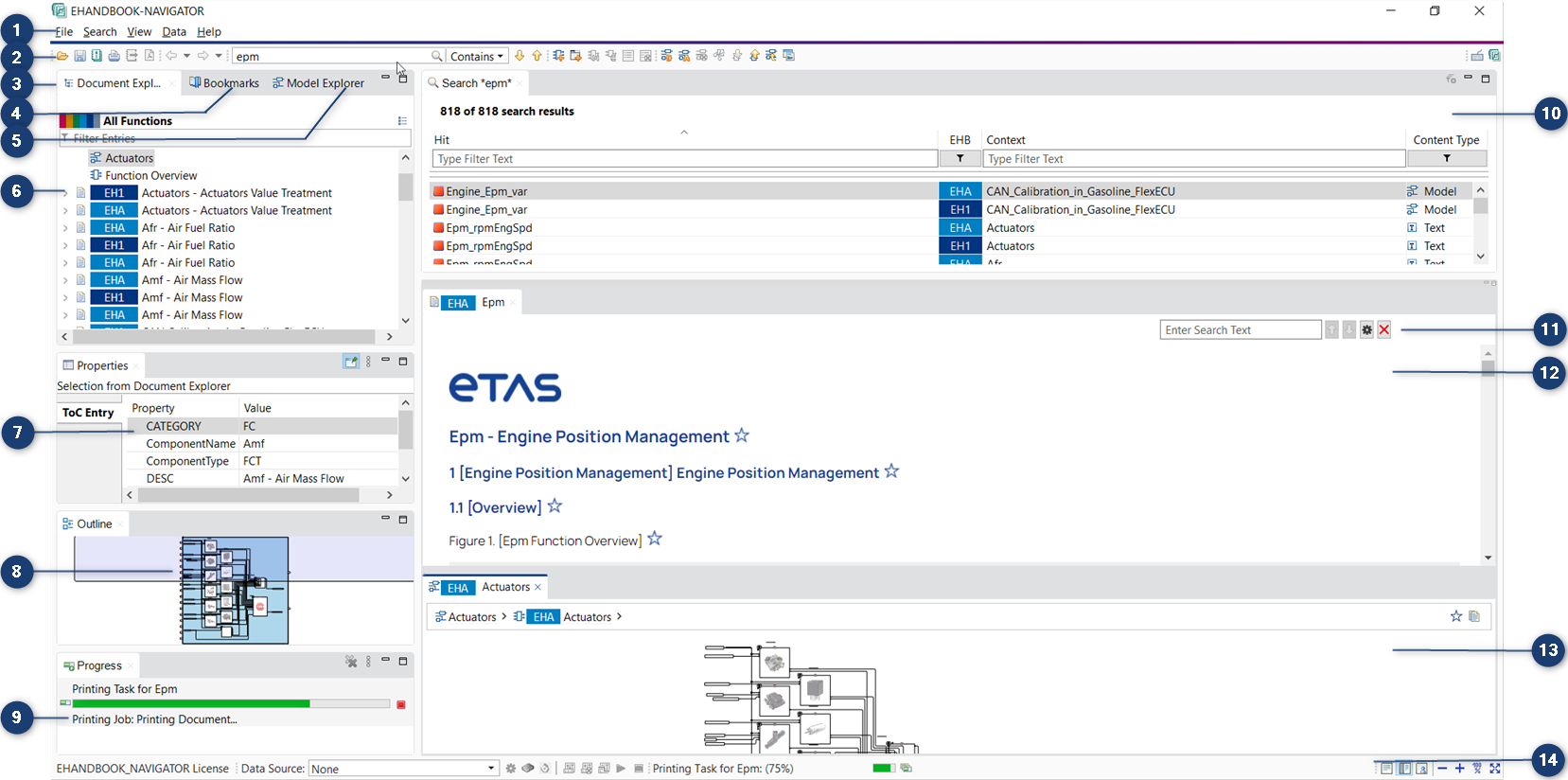
The GUI (Graphical User Interface) of the EHANDBOOK-NAVIGATOR comprises of the following:

  1. Menus

  2. Toolbar

  3. Document Explorer

  4. Bookmarks

  5. Model Explorer

  6. Table of Contents

  7. Outline View

  8. Properties View

  9. Progress View

  10. Search Results View

  11. Find in current tab

  12. Document Viewer

  13. Model Viewer

  14. Status Bar

To avail all the features of EHANDBOOK-NAVIGATOR, obtain license by visiting the ETAS website.

© 2026 ETAS GmbH Corporate information Terms of use / legal notice Data protection notice (privacy policy) Terms and Conditions Privacy settings