How to Filter and Sort Keyboard Shortcuts
Procedure
EHANDBOOK-NAVIGATOR supports filtering and sorting of available keyboard shortcuts.
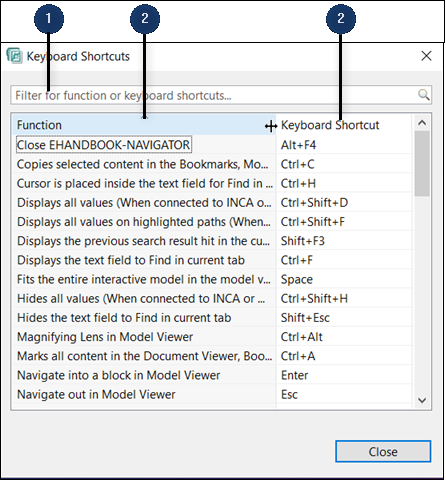
-
Filter field
-
Sort button
To filter keyboard shortcuts:
-
Go to
Helpmenu and clickKeyboard Shortcuts… (<CTRL+F1>).
<Or> -
Click
Keyboard Shortcutsbutton in the toolbar.
Keyboard Shortcutswindow is displayed. -
Type the text in the
Filter field(1).
Filtered entries are displayed.
To sort keyboard shortcuts:
-
Go to
Helpmenu and clickKeyboard Shortcuts… (<CTRL+F1>).
<Or> -
Click
Keyboard Shortcutsbutton in the toolbar.
Keyboard Shortcutswindow is displayed. -
Click
Sortbutton(2).
The column is sorted alphabetically from A-Z. -
To reverse the sorting click on the Sort button again.