Excel Format Specification
Introduction
The ETAS XLSX converter add-on for the Directory-Based EHANDBOOK Container-Build toolchain extracts model interface data from XLSX files and stores it in an internal metadata database in the container.
Typically, one XLSX file is placed in each subdirectory. The subdirectory normally represents a function component and contains the related model file.
Model interface data includes variables and parameters with their metadata, such as the compu-method and data type. It also includes the interfaces of Simulink, ASCET, or C-code models. For example, it specifies which variable is exported by one function and which variable is imported by another function.
This data enables several EHB-NAV features, including:
-
Label Tagging
-
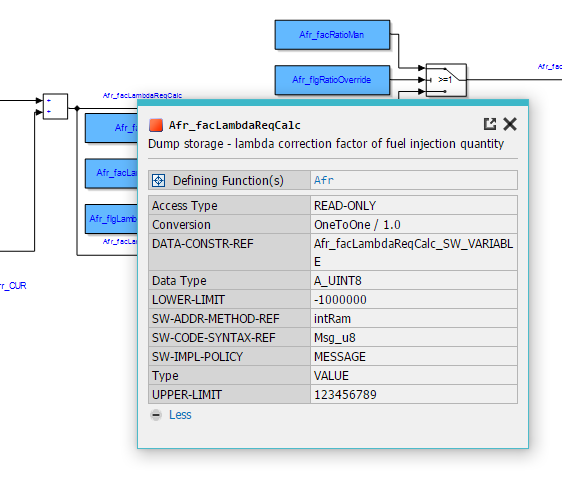
Label Pop-up
-
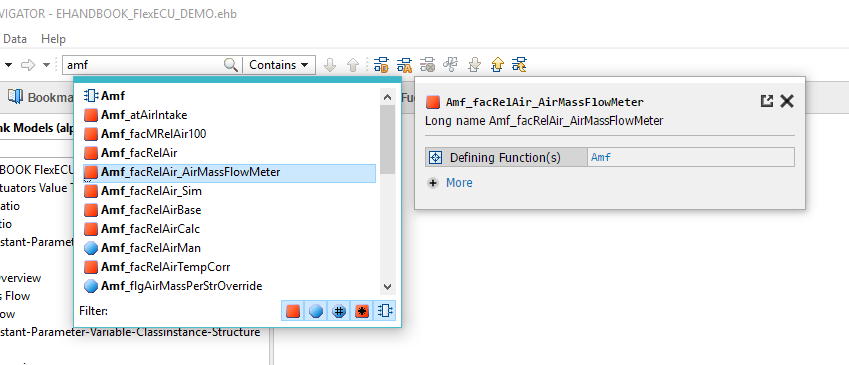
Search Proposals
-
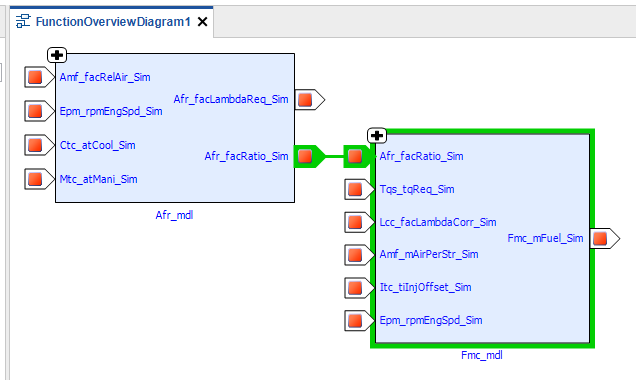
Function Overview
-
Importing and Exporting Functions
The database content is also used for the search indexing process in EHB-CB.
|
The mapping procedure for the EHB-NAV feature “Function Overview” is based only on names. The name of a parameter or variable exported by one function must be the same as the name used by the function that imports it. Therefore, every label name must be unique. This follows the same principle as the existing A2L specification. |
This document describes the XLSX features and required structure supported by the EHANDBOOK Container-Build tool.
|
For Simulink models, an XLSX file can also be generated automatically from the model using an M-script. ETAS can provide a sample for this. |
Given XLSX Structure
File Location and Usage
Exactly one XLSX file is required for each functional component. The XLSX file must be placed in the same directory as the corresponding Simulink, ASCET, or C-code model.
The name of the XLSX file is not relevant.
XLSX to EHB Content Mapping
The XLSX file contains the following worksheets:
-
“Calibration” for calibration parameters
-
“Signal” for measurement signals
-
“SystemConstant” for system constants
Each worksheet can contain the following columns.
Mandatory: Column name “Xref”
The “Xref” column is shown in EHB tables as the “MODE” column.
For the “Calibration” and “Signal” sheets, only the following Xref values are allowed.
DEF
-
Parameters that are defined in this function
-
Shown in the EHB parameter table as the value export
REF
-
Parameters that are used in this function but defined in another function
-
Shown in the EHB parameter table as the value import
LOC
-
Parameters that are used only locally inside the function
-
Shown in the EHB parameter table as the value local
IN
-
Signal is read or imported by this function
-
Shown in the EHB variable table as the value import
OUT
-
Signal is written or exported by this function
-
Shown in the EHB variable table as the value export
LOC
-
Signal is used only as a local variable inside the function
-
Shown in the EHB variable table as the value local
Optional: Column name “Class”
The “Class” column defines the type of the element. Any text can be entered in this column.
It is shown in EHB tables as the “TYPE” column.
Mandatory: Column name “Name”
The “Name” column contains the name of the element. The name must use the same spelling as in the Simulink model.
It is shown in EHB tables as the “NAME” column.
Optional: Column name “Description”
The “Description” column contains a description of the element.
It is shown in EHB tables as the “LONG NAME” column.
Optional: Column name “Access”
The “Access” column specifies the access type of the element. Any text can be entered in this column.
It is shown in EHB tables as the “ACCESS” column.
Optional: Column name “ParentName”
The “ParentName” column contains the name of the parent element for a complex data type, such as a structure. Any text can be entered in this column.
Example:
| Xref | Name | ParentName |
|---|---|---|
LOC |
Sensor |
|
LOC |
Sensor.Value |
Sensor |
LOC |
Sensor.Qualifier |
Sensor |
If a column is missing, the default value “-” is shown in EHB tables.
|
All column heading strings and Xref values must be written exactly as specified. Uppercase and lowercase letters are not considered. The order of the column headings can be changed. |
All additional columns in the XLSX file are also read and shown in the EHB-NAV Label Pop-up and Search Proposal dialogs as property-value tables.
The column headings and their contents can contain any text. They are displayed as they appear in the XLSX file and in the same order.
The first column with an empty heading marks the end of the XLSX table. If the content contains too many characters, it is limited and truncated.
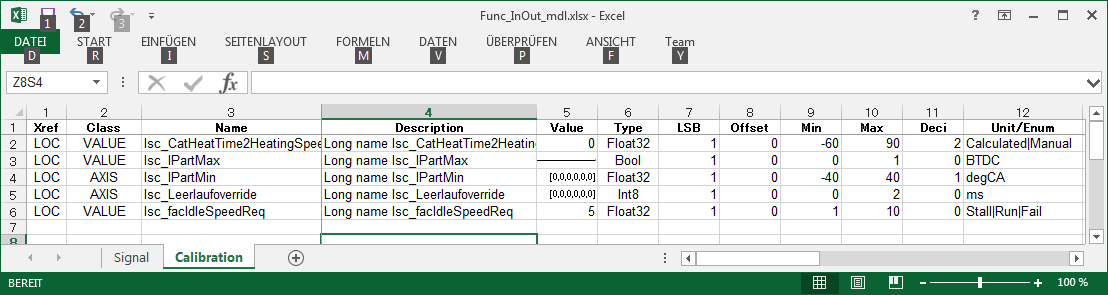
Example for parameters in XLSX:
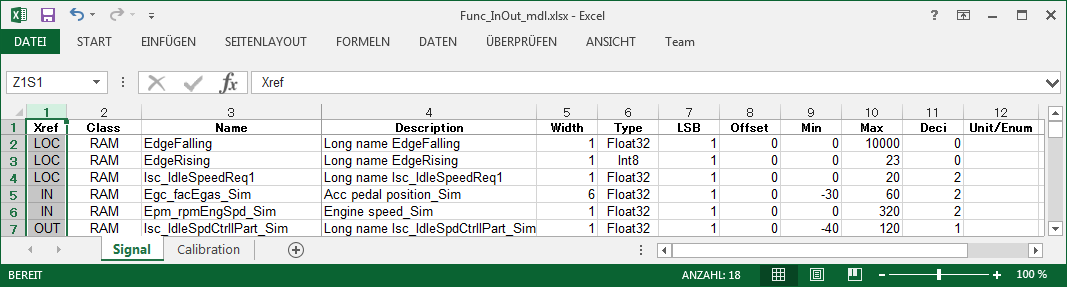
Example for variables in XLSX:
EHB-NAV View
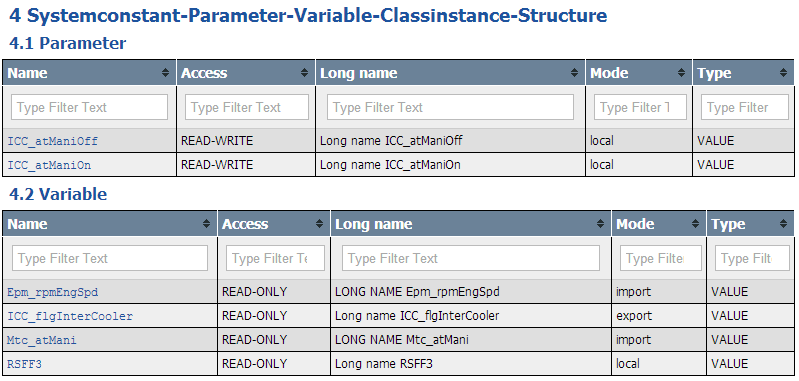
The content from the XLSX file is used and displayed in EHB-NAV in several ways.
|
The chapter and column names, the number of tables, and the number of columns can be configured using a JSON file. For more information, see the EHB-CB user documentation. |